
前言:那個令人抓狂的錯誤訊息
在開發前後端分離的 Web 應用時,幾乎每位工程師都曾遇過這個令人頭痛的錯誤:
Access to fetch at 'http://localhost:1337/api/auth/local' from origin
'http://localhost:5173' has been blocked by CORS policy: No
'Access-Control-Allow-Origin' header is present on the requested resource.
這個錯誤通常發生在最關鍵的時刻:
- 前端登入功能即將完成,卻無法呼叫後端 API
- 串接第三方服務時,資料無法正常取得
- 部署到測試環境後,原本運作正常的功能突然失效
CORS(Cross-Origin Resource Sharing,跨來源資源共用)是現代 Web 開發中的核心安全機制,但也是許多開發者的痛點。這篇文章將從基礎原理到實戰應用,帶你完整理解 CORS 的運作方式,並提供實際可用的解決方案。
為什麼需要 CORS?從同源政策說起
同源政策的誕生
在理解 CORS 之前,我們需要先認識「同源政策」(Same-Origin Policy, SOP)。這是瀏覽器最基本的安全機制,在 1995 年 Netscape Navigator 2.0 引入 JavaScript 時就已經存在。
同源政策的目的:防止惡意網站讀取另一個網站的敏感資料。
想像一個情境:你登入了網路銀行(https://bank.com),此時你的瀏覽器保存了銀行的登入 Cookie。如果沒有同源政策,當你不小心訪問了一個惡意網站(https://evil.com),該網站的 JavaScript 就能透過你的瀏覽器向 https://bank.com 發送請求,並讀取你的帳戶資料。
同源政策阻止了這種攻擊:https://evil.com 的 JavaScript 無法讀取 https://bank.com 的回應內容。
什麼是「同源」?
兩個 URL 被視為同源,必須滿足以下三個條件:
- 協定(Protocol)相同:
httpvshttps - 網域(Domain)相同:
example.comvsapi.example.com - 埠號(Port)相同:
80vs8080
只要有任何一項不同,就視為「跨來源」(Cross-Origin)。

實際範例:
假設當前頁面是 https://www.example.com/page.html
| URL | 是否同源 | 原因 |
|---|---|---|
https://www.example.com/api/data | ✅ 同源 | 協定、網域、埠號都相同 |
http://www.example.com/api/data | ❌ 跨源 | 協定不同(http vs https) |
https://api.example.com/data | ❌ 跨源 | 網域不同(www vs api) |
https://www.example.com:8080/data | ❌ 跨源 | 埠號不同(443 vs 8080) |
https://www.evil.com/steal | ❌ 跨源 | 網域完全不同 |
前後端分離架構的挑戰
在傳統的 Monolithic 架構中,前端和後端都部署在同一個網域下,不會遇到 CORS 問題。但在現代的前後端分離架構中:
- 前端:
https://app.example.com(靜態檔案,部署在 CDN) - 後端 API:
https://api.example.com(動態服務,部署在應用伺服器)
這兩者屬於不同的子網域,所有 API 請求都是跨來源請求。這就是為什麼我們需要 CORS。
CORS 的運作原理
CORS 是一個 W3C 標準,允許伺服器明確聲明「哪些來源可以存取我的資源」。它透過一系列 HTTP Headers 來實現這個機制。
簡單請求 vs 預檢請求
CORS 將跨來源請求分為兩類:
- 簡單請求(Simple Request):直接發送實際請求
- 預檢請求(Preflight Request):先發送 OPTIONS 請求確認權限,再發送實際請求

簡單請求的條件
請求必須同時滿足以下所有條件,才會被視為簡單請求:
1. HTTP 方法限制:只能是以下三種之一
GETPOSTHEAD
2. Headers 限制:除了瀏覽器自動設定的 Headers(如 User-Agent),只能包含以下 Headers:
AcceptAccept-LanguageContent-LanguageContent-Type(但僅限以下三種值)application/x-www-form-urlencodedmultipart/form-datatext/plain
3. 不能使用自訂 Headers:如 Authorization、X-Custom-Header 等
4. 不能註冊 XMLHttpRequest 的事件監聽器
實際案例分析:
// ✅ 簡單請求範例
fetch('https://api.example.com/data', {
  method: 'GET',
  headers: {
    'Accept': 'application/json'
  }
});

// ❌ 預檢請求範例(因為使用了 Authorization header)
fetch('https://api.example.com/data', {
  method: 'GET',
  headers: {
    'Accept': 'application/json',
    'Authorization': 'Bearer token123'  // 觸發預檢
  }
});

// ❌ 預檢請求範例(因為 Content-Type 不在允許清單)
fetch('https://api.example.com/data', {
  method: 'POST',
  headers: {
    'Content-Type': 'application/json'  // 觸發預檢
  },
  body: JSON.stringify({ name: 'Peter' })
});
預檢請求的完整流程
當請求不符合簡單請求的條件時,瀏覽器會先發送一個 OPTIONS 請求,詢問伺服器是否允許這個跨來源請求。
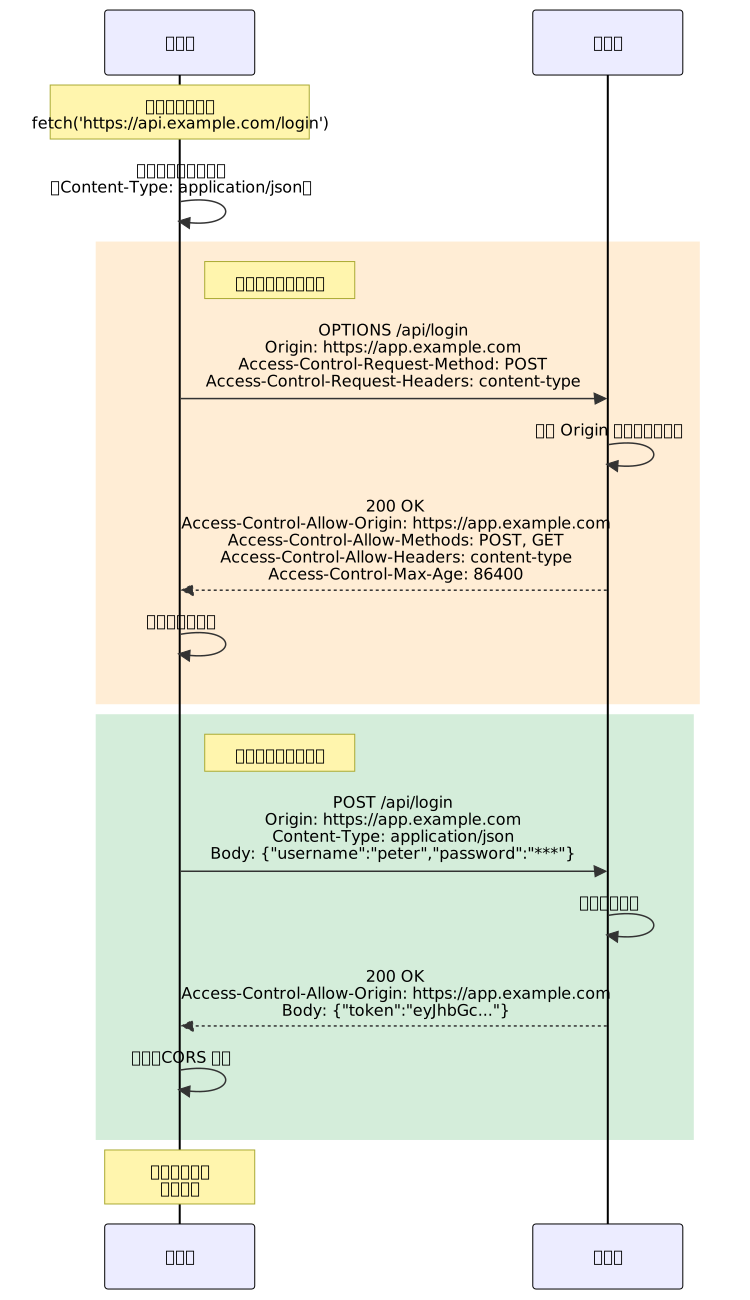
預檢請求的關鍵 Headers:
| Header | 方向 | 用途 | 範例 |
|---|---|---|---|
Origin | 請求 | 告知伺服器請求來自哪個來源 | https://app.example.com |
Access-Control-Request-Method | 請求 | 告知實際請求會用什麼 HTTP 方法 | POST |
Access-Control-Request-Headers | 請求 | 告知實際請求會帶哪些自訂 Headers | content-type, authorization |
Access-Control-Allow-Origin | 回應 | 允許的來源(單一值或 *) | https://app.example.com |
Access-Control-Allow-Methods | 回應 | 允許的 HTTP 方法 | GET, POST, PUT, DELETE |
Access-Control-Allow-Headers | 回應 | 允許的自訂 Headers | Content-Type, Authorization |
Access-Control-Max-Age | 回應 | 預檢結果的快取時間(秒) | 86400(24 小時) |
Credentials 與 Cookie 傳遞
預設情況下,跨來源請求不會傳送 Cookie、HTTP Authentication 或 TLS 客戶端憑證。
如果你需要在跨來源請求中傳送 Cookie(例如保持登入狀態),需要同時設定前端和後端:
前端設定:
fetch('https://api.example.com/user/profile', {
  method: 'GET',
  credentials: 'include'  // 傳送 Cookie
});
後端設定:
// 伺服器必須回應
Access-Control-Allow-Credentials: true
Access-Control-Allow-Origin: https://app.example.com  // 不能是 *
重要限制:當 credentials: true 時,Access-Control-Allow-Origin 不能設為 *,必須明確指定來源。
常見的 CORS 錯誤場景與解決方案
錯誤情境一:Multiple Origins 格式錯誤
這是最常見的錯誤之一,通常發生在使用環境變數設定 CORS 時。
錯誤設定:
# .env
CORS_URLS=https://app.example.com,http://localhost:5173,http://localhost:1337
錯誤的後端實作(直接將字串傳給 header):
// ❌ 錯誤:將逗號分隔的字串直接傳給 header
app.use((req, res, next) => {
  res.setHeader('Access-Control-Allow-Origin', process.env.CORS_URLS);
  next();
});
實際回應:
Access-Control-Allow-Origin: https://app.example.com,http://localhost:5173,http://localhost:1337
問題:Access-Control-Allow-Origin 只能是單一值或 *,不能是逗號分隔的清單。
瀏覽器錯誤訊息:
The 'Access-Control-Allow-Origin' header contains multiple values
'https://app.example.com,http://localhost:5173,http://localhost:1337',
but only one is allowed.
正確解法:動態判斷請求的 Origin,只回應符合的單一值
// ✅ 正確:動態回應單一 Origin
const allowedOrigins = process.env.CORS_URLS?.split(',') || [];

app.use((req, res, next) => {
  const origin = req.headers.origin;

  if (allowedOrigins.includes(origin)) {
    res.setHeader('Access-Control-Allow-Origin', origin);
    res.setHeader('Access-Control-Allow-Credentials', 'true');
  }

  next();
});
錯誤情境二:遺漏 Credentials Header
當前端設定 credentials: 'include' 但後端沒有回應對應的 header。
前端程式碼:
fetch('https://api.example.com/api/auth/local', {
  method: 'POST',
  credentials: 'include',  // 要傳送 Cookie
  headers: {
    'Content-Type': 'application/json'
  },
  body: JSON.stringify({
    identifier: 'user@example.com',
    password: 'password123'
  })
});
後端錯誤設定:
// ❌ 只設定了 Allow-Origin,沒有 Allow-Credentials
res.setHeader('Access-Control-Allow-Origin', 'https://app.example.com');
瀏覽器錯誤訊息:
The value of the 'Access-Control-Allow-Credentials' header in the response
is '' which must be 'true' when the request's credentials mode is 'include'.
正確解法:
// ✅ 必須同時設定兩個 headers
res.setHeader('Access-Control-Allow-Origin', 'https://app.example.com');
res.setHeader('Access-Control-Allow-Credentials', 'true');
錯誤情境三:預檢請求回應錯誤
OPTIONS 請求沒有正確處理,導致實際請求無法發送。
錯誤實作:
// ❌ OPTIONS 請求沒有回應 CORS headers
app.options('/api/login', (req, res) => {
  res.status(200).end();  // 空回應
});
瀏覽器錯誤訊息:
Response to preflight request doesn't pass access control check:
No 'Access-Control-Allow-Origin' header is present on the requested resource.
正確解法:
// ✅ OPTIONS 請求必須回應完整的 CORS headers
app.options('/api/login', (req, res) => {
  res.setHeader('Access-Control-Allow-Origin', 'https://app.example.com');
  res.setHeader('Access-Control-Allow-Methods', 'POST, GET, OPTIONS');
  res.setHeader('Access-Control-Allow-Headers', 'Content-Type, Authorization');
  res.setHeader('Access-Control-Max-Age', '86400');  // 快取 24 小時
  res.status(204).end();  // 204 No Content
});
錯誤情境四:使用萬用字元與 Credentials 衝突
這是安全性相關的限制,容易被忽略。
錯誤設定:
// ❌ 不能同時使用 * 和 credentials: true
res.setHeader('Access-Control-Allow-Origin', '*');
res.setHeader('Access-Control-Allow-Credentials', 'true');
瀏覽器錯誤訊息:
The value of the 'Access-Control-Allow-Origin' header in the response must
not be the wildcard '*' when the request's credentials mode is 'include'.
正確解法:
// ✅ 明確指定 Origin
res.setHeader('Access-Control-Allow-Origin', req.headers.origin);
res.setHeader('Access-Control-Allow-Credentials', 'true');
實戰設定指南
Strapi CMS 的 CORS 設定
Strapi 是一個熱門的 Headless CMS,在前後端分離架構中經常遇到 CORS 問題。
完整設定範例(config/middlewares.js):
module.exports = [
  'strapi::errors',
  'strapi::security',
  {
    name: 'strapi::cors',
    config: {
      // 允許的來源清單
      origin: [
        'http://localhost:5173',       // Vite 開發環境
        'http://localhost:3000',       // Next.js 開發環境
        'https://app.example.com',     // 生產環境前端
        'https://staging.example.com'  // 測試環境前端
      ],
      // 允許的 HTTP 方法
      methods: ['GET', 'POST', 'PUT', 'PATCH', 'DELETE', 'OPTIONS'],
      // 允許的 Headers
      headers: [
        'Content-Type',
        'Authorization',
        'X-Frame-Options'
      ],
      // 允許傳送 Credentials(Cookie)
      credentials: true,
      // 暴露給前端的 Headers
      exposedHeaders: ['X-Total-Count'],
      // 預檢請求快取時間(秒)
      maxAge: 86400
    },
  },
  'strapi::poweredBy',
  'strapi::logger',
  'strapi::query',
  'strapi::body',
  'strapi::session',
  'strapi::favicon',
  'strapi::public',
];
使用環境變數動態設定:
// config/middlewares.js
module.exports = ({ env }) => {
  // 從環境變數讀取並轉換為陣列
  const corsOrigins = env('CORS_URLS', 'http://localhost:5173').split(',');

  return [
    'strapi::errors',
    'strapi::security',
    {
      name: 'strapi::cors',
      config: {
        origin: corsOrigins,
        credentials: true,
      },
    },
    // ... 其他 middlewares
  ];
};
# .env
CORS_URLS=https://app.example.com,https://admin.example.com,http://localhost:5173
Express.js 的 CORS 設定
Express 是最流行的 Node.js Web 框架,可使用 cors 套件快速設定。
安裝套件:
npm install cors
基本設定:
const express = require('express');
const cors = require('cors');

const app = express();

// ✅ 方法一:允許所有來源(僅適用於公開 API)
app.use(cors());

// ✅ 方法二:設定允許的來源清單
app.use(cors({
  origin: [
    'https://app.example.com',
    'http://localhost:3000'
  ],
  credentials: true  // 允許 Cookie
}));

// ✅ 方法三:動態驗證來源
const allowedOrigins = [
  'https://app.example.com',
  'http://localhost:3000',
  /\.example\.com$/  // 支援正規表達式
];

app.use(cors({
  origin: function (origin, callback) {
    // 允許沒有 origin 的請求(例如 Postman、curl)
    if (!origin) return callback(null, true);

    // 檢查是否在允許清單
    const isAllowed = allowedOrigins.some(allowed => {
      if (allowed instanceof RegExp) {
        return allowed.test(origin);
      }
      return allowed === origin;
    });

    if (isAllowed) {
      callback(null, true);
    } else {
      callback(new Error('Not allowed by CORS'));
    }
  },
  credentials: true
}));
針對特定路由設定:
// 公開 API:允許所有來源
app.get('/api/public/data', cors(), (req, res) => {
  res.json({ message: 'Public data' });
});

// 私有 API:僅允許特定來源
const privateCors = cors({
  origin: 'https://app.example.com',
  credentials: true
});

app.post('/api/private/user', privateCors, (req, res) => {
  res.json({ message: 'Private data' });
});
Nginx 反向代理的 CORS 設定
在生產環境中,通常會使用 Nginx 作為反向代理,可以在 Nginx 層級處理 CORS。
基本設定(/etc/nginx/sites-available/api.example.com):
server {
    listen 443 ssl http2;
    server_name api.example.com;

    # SSL 憑證設定
    ssl_certificate /path/to/cert.pem;
    ssl_certificate_key /path/to/key.pem;

    location / {
        # 反向代理到後端服務
        proxy_pass http://localhost:3000;

        # 設定 CORS Headers
        add_header 'Access-Control-Allow-Origin' 'https://app.example.com' always;
        add_header 'Access-Control-Allow-Methods' 'GET, POST, PUT, DELETE, OPTIONS' always;
        add_header 'Access-Control-Allow-Headers' 'Content-Type, Authorization' always;
        add_header 'Access-Control-Allow-Credentials' 'true' always;

        # 處理預檢請求
        if ($request_method = 'OPTIONS') {
            add_header 'Access-Control-Allow-Origin' 'https://app.example.com' always;
            add_header 'Access-Control-Allow-Methods' 'GET, POST, PUT, DELETE, OPTIONS' always;
            add_header 'Access-Control-Allow-Headers' 'Content-Type, Authorization' always;
            add_header 'Access-Control-Max-Age' 86400 always;
            add_header 'Content-Length' 0;
            return 204;
        }
    }
}
動態處理多個來源:
# 使用 map 指令動態設定 Origin
map $http_origin $cors_origin {
    default "";
    "https://app.example.com" $http_origin;
    "https://admin.example.com" $http_origin;
    "~^https://.*\.example\.com$" $http_origin;  # 正規表達式
}

server {
    listen 443 ssl http2;
    server_name api.example.com;

    location / {
        proxy_pass http://localhost:3000;

        # 僅當 Origin 符合時才回應 CORS headers
        add_header 'Access-Control-Allow-Origin' $cors_origin always;
        add_header 'Access-Control-Allow-Credentials' 'true' always;

        if ($request_method = 'OPTIONS') {
            add_header 'Access-Control-Allow-Origin' $cors_origin always;
            add_header 'Access-Control-Allow-Methods' 'GET, POST, PUT, DELETE, OPTIONS' always;
            add_header 'Access-Control-Allow-Headers' 'Content-Type, Authorization' always;
            add_header 'Access-Control-Max-Age' 86400 always;
            return 204;
        }
    }
}
Next.js 的 CORS 設定
Next.js API Routes 需要手動處理 CORS。
方法一:使用 next-cors 套件:
npm install next-cors
// pages/api/data.js
import NextCors from 'next-cors';

export default async function handler(req, res) {
  // 執行 CORS middleware
  await NextCors(req, res, {
    origin: ['https://app.example.com', 'http://localhost:3000'],
    methods: ['GET', 'POST', 'PUT', 'DELETE', 'OPTIONS'],
    credentials: true,
  });

  // 你的 API 邏輯
  res.json({ message: 'Hello from Next.js API' });
}
方法二:手動實作 CORS middleware:
// lib/cors.js
const allowedOrigins = [
  'https://app.example.com',
  'http://localhost:3000'
];

export function cors(req, res) {
  const origin = req.headers.origin;

  if (allowedOrigins.includes(origin)) {
    res.setHeader('Access-Control-Allow-Origin', origin);
  }

  res.setHeader('Access-Control-Allow-Credentials', 'true');
  res.setHeader('Access-Control-Allow-Methods', 'GET, POST, PUT, DELETE, OPTIONS');
  res.setHeader('Access-Control-Allow-Headers', 'Content-Type, Authorization');

  // 處理預檢請求
  if (req.method === 'OPTIONS') {
    res.setHeader('Access-Control-Max-Age', '86400');
    res.status(204).end();
    return true;  // 表示已經處理完畢
  }

  return false;
}
// pages/api/login.js
import { cors } from '../../lib/cors';

export default function handler(req, res) {
  // 執行 CORS 檢查
  if (cors(req, res)) return;  // 預檢請求已處理

  // 你的 API 邏輯
  if (req.method === 'POST') {
    // 處理登入
    res.json({ token: 'abc123' });
  } else {
    res.status(405).json({ error: 'Method not allowed' });
  }
}
CORS 錯誤排查流程
當遇到 CORS 錯誤時,可以按照以下流程進行排查。

使用 DevTools 檢查 CORS
步驟一:開啟 Network 分頁
- 按 F12 開啟開發者工具
- 切換到「Network」分頁
- 重新載入頁面或觸發 API 請求
步驟二:找到失敗的請求
- 失敗的跨來源請求會顯示為紅色
- 檢查請求的 Status Code(通常是 CORS 錯誤)
步驟三:檢查 Headers
點擊請求,查看「Headers」分頁:
請求 Headers(Request Headers):
Origin: https://app.example.com
Access-Control-Request-Method: POST
Access-Control-Request-Headers: content-type, authorization
回應 Headers(Response Headers):
Access-Control-Allow-Origin: https://app.example.com
Access-Control-Allow-Methods: GET, POST, PUT, DELETE
Access-Control-Allow-Headers: Content-Type, Authorization
Access-Control-Allow-Credentials: true
步驟四:檢查 Console 的錯誤訊息
Console 會顯示具體的 CORS 錯誤原因:
Access to fetch at 'https://api.example.com/login' from origin
'https://app.example.com' has been blocked by CORS policy:
Response to preflight request doesn't pass access control check:
The value of the 'Access-Control-Allow-Credentials' header in the
response is '' which must be 'true' when the request's credentials
mode is 'include'.
常見錯誤訊息解讀
| 錯誤訊息 | 原因 | 解決方法 |
|---|---|---|
No 'Access-Control-Allow-Origin' header is present | 後端沒有設定 CORS | 加入 Access-Control-Allow-Origin header |
The 'Access-Control-Allow-Origin' header contains multiple values | Origin header 格式錯誤 | 改為回應單一 Origin 值 |
The 'Access-Control-Allow-Origin' header has a value '...' that is not equal to the supplied origin | Origin 不符合 | 將請求的 Origin 加入允許清單 |
Credentials flag is 'true', but 'Access-Control-Allow-Credentials' header is '' | 使用 credentials 但後端未設定 | 加入 Access-Control-Allow-Credentials: true |
The value of the 'Access-Control-Allow-Origin' header must not be '*' when credentials mode is 'include' | Credentials 與萬用字元衝突 | 改為明確指定 Origin |
Method ... is not allowed by Access-Control-Allow-Methods | HTTP 方法不在允許清單 | 在 Access-Control-Allow-Methods 加入該方法 |
Request header field ... is not allowed by Access-Control-Allow-Headers | 自訂 header 不在允許清單 | 在 Access-Control-Allow-Headers 加入該 header |
進階主題
Vary Header 的重要性
當使用動態 CORS(根據請求的 Origin 回應不同值)時,必須加入 Vary: Origin header。
為什麼需要 Vary?
假設你的 API 允許兩個來源:
https://app.example.comhttps://admin.example.com
如果沒有 Vary: Origin,CDN 或瀏覽器快取可能會發生以下問題:
https://app.example.com請求 → 伺服器回應Access-Control-Allow-Origin: https://app.example.com- 快取儲存這個回應
https://admin.example.com請求 → 直接從快取回傳,仍然是Access-Control-Allow-Origin: https://app.example.com- CORS 錯誤!因為 Origin 不符
正確設定:
app.use((req, res, next) => {
  const origin = req.headers.origin;

  if (allowedOrigins.includes(origin)) {
    res.setHeader('Access-Control-Allow-Origin', origin);
    res.setHeader('Vary', 'Origin');  // 關鍵!
  }

  next();
});
Vary: Origin 告訴快取系統:「這個回應會根據 Origin header 而不同,請分別快取」。
OPTIONS 請求的快取
預檢請求(OPTIONS)可以透過 Access-Control-Max-Age 進行快取,減少不必要的網路請求。
設定範例:
res.setHeader('Access-Control-Max-Age', '86400'); // 24 小時
注意事項:
- Chrome 的最大值為
600(10 分鐘)(舊版本,新版已支援更長) - Firefox 最大值為
86400(24 小時) - 不同瀏覽器的實作可能不同
建議值:
- 開發環境:
600(10 分鐘) - 生產環境:
86400(24 小時)
CORS 與 CSRF 的關係
CORS 和 CSRF(Cross-Site Request Forgery,跨站請求偽造)是兩個不同但相關的安全概念。
CORS 無法防禦 CSRF:
即使正確設定 CORS,惡意網站仍然可以發送「簡單請求」(例如表單提交),因為這些請求不會被預檢。
CSRF 攻擊範例:
<!-- 惡意網站的 HTML -->
<form action="https://bank.com/transfer" method="POST">
  <input type="hidden" name="to" value="attacker">
  <input type="hidden" name="amount" value="1000">
</form>
<script>
  document.forms[0].submit();
</script>
如果使用者已經登入銀行網站,這個請求會帶著 Cookie 發送,可能成功執行轉帳。
CORS 的限制:
- CORS 只阻止讀取回應,不阻止發送請求
- 簡單請求(如表單 POST)不會觸發預檢
防禦 CSRF 的方法:
- CSRF Token:在表單中加入隨機 token
- SameSite Cookie:設定
SameSite=Strict或SameSite=Lax - 檢查 Referer/Origin Header:驗證請求來源
- 要求自訂 Header:強制觸發預檢(例如
X-Requested-With: XMLHttpRequest)
生產環境的 CORS 最佳實踐
1. 明確指定允許的來源
// ❌ 避免在生產環境使用
origin: '*'

// ✅ 明確列出允許的來源
origin: [
  'https://app.example.com',
  'https://admin.example.com'
]
2. 使用環境變數管理來源清單
// .env.production
CORS_URLS=https://app.example.com,https://admin.example.com

// .env.development
CORS_URLS=http://localhost:3000,http://localhost:5173
3. 記錄被拒絕的請求
app.use((req, res, next) => {
  const origin = req.headers.origin;

  if (allowedOrigins.includes(origin)) {
    res.setHeader('Access-Control-Allow-Origin', origin);
  } else if (origin) {
    // 記錄未授權的請求
    console.warn(`Blocked CORS request from: ${origin}`);
  }

  next();
});
4. 針對不同 API 設定不同的 CORS 政策
// 公開 API:允許所有來源
app.get('/api/public/*', cors({ origin: '*' }), publicHandler);

// 私有 API:僅允許特定來源
app.use('/api/private/*', cors({
  origin: privateOrigins,
  credentials: true
}), privateHandler);
5. 設定適當的快取時間
// 開發環境:短時間快取,方便測試
const maxAge = process.env.NODE_ENV === 'production' ? 86400 : 300;
res.setHeader('Access-Control-Max-Age', maxAge);
結語
CORS 是現代 Web 開發中不可避免的主題,雖然初次接觸時可能覺得複雜,但理解其運作原理後,就能快速定位問題並找到解決方案。
核心要點回顧:
- 同源政策是基礎:理解什麼是「同源」,為什麼需要 CORS
- 簡單請求 vs 預檢請求:知道什麼時候會觸發 OPTIONS 請求
- Credentials 的限制:使用 Cookie 時不能用萬用字元
* - 動態回應 Origin:支援多來源時,必須根據請求動態回應
- Vary Header 不可少:防止快取問題
- 善用 DevTools:Network 分頁是排查 CORS 的最佳工具
實戰建議:
- 開發環境可以寬鬆設定,但生產環境務必嚴格限制
- 使用現成的 CORS 套件(如
cors)可以減少錯誤 - 在 Nginx 層級處理 CORS 可以統一管理
- 記得加入適當的錯誤日誌,方便追蹤問題
希望這篇文章能幫助你徹底理解 CORS,再也不用為那些紅色的錯誤訊息煩惱!