
前言
在現代 Web 應用開發中,提供第三方登入(Social Login)已經成為標準配備。相比傳統的帳號密碼註冊流程,使用 Google、Facebook、GitHub 等服務登入不僅能降低使用者註冊門檻,還能提升安全性(由大廠處理密碼儲存與驗證)。
當我們決定為 Strapi CMS 後台加入 Google OAuth 登入時,原本以為只是個簡單的設定任務:
- 在 Google Cloud Console 建立 OAuth 2.0 憑證
- 在 Strapi 填入 Client ID 和 Client Secret
- 點擊「Login with Google」按鈕,完成!
但現實總是更複雜。當應用部署到 Kubernetes 叢集後,我們遇到了一個令人困惑的錯誤訊息:
Error: Cannot send secure cookie over unencrypted connection
這個錯誤訊息背後,牽涉到 HTTP/HTTPS 協定、Proxy Trust 機制、Kubernetes Ingress 架構、以及瀏覽器 Cookie 安全策略等多層知識。這篇文章將完整記錄我如何一步步拆解問題、理解根本原因、並最終在生產環境中實現安全可靠的 Google 登入功能。
OAuth 2.0 授權碼流程基礎
在深入問題之前,我們先理解 Google OAuth 登入的完整流程。OAuth 2.0 提供了多種授權模式(Grant Types),而 Web 應用最常使用的是「授權碼模式(Authorization Code Flow)」。
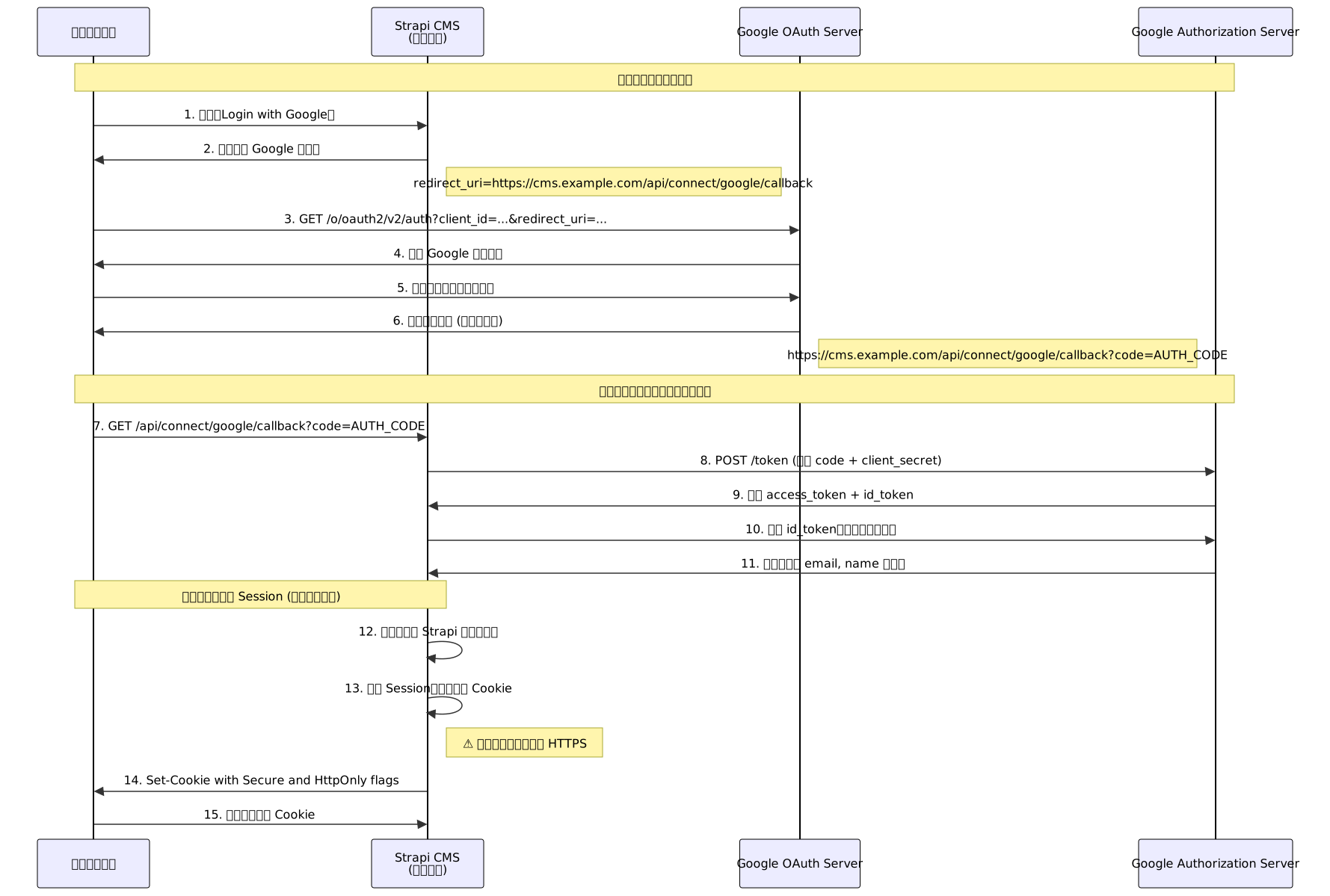
這個流程中有幾個關鍵點:
- 授權碼(Authorization Code):一次性使用的臨時憑證,只能用來換取 Access Token
- 重導向 URI(Redirect URI):必須與 Google Console 設定完全一致,包括 protocol(http/https)、domain、path
- Secure Cookie:為了安全性,Session Cookie 通常會設定
Secure屬性,要求只能在 HTTPS 連線中傳輸 - 問題發生點:在第 13 步,Strapi 嘗試設定 Secure Cookie 時,如果它認為當前連線是 HTTP,就會拋出錯誤
Strapi Google Provider 內部架構
Strapi 使用了 @strapi/plugin-users-permissions 來處理第三方登入。讓我們看看 Google Provider 的內部運作流程:

從這個流程圖可以看出,問題發生在最後階段:Strapi 在設定 Session Cookie 時,會檢查當前連線是否為 HTTPS。
但這裡有個關鍵問題:在 Kubernetes 環境中,Strapi Pod 收到的請求可能已經被 Ingress Controller 解密,從 Pod 的角度看,連線是 HTTP。
Kubernetes 網路層級分析
在 Kubernetes 部署環境中,使用者的 HTTPS 請求會經過多層轉發才到達 Strapi Pod。讓我們看看完整的網路路徑:

這個架構帶來的問題是:
- 使用者端:確實是透過 HTTPS 連線(
https://cms.example.com) - Load Balancer / Ingress:在這層進行 TLS 終止(TLS Termination),解密 HTTPS 流量
- Strapi Pod:收到的是已解密的 HTTP 請求
這種架構稱為「TLS 終止代理(TLS Termination Proxy)」,是 Kubernetes 環境中的標準做法。但這也導致 Strapi 無法直接判斷「使用者原始請求是否為 HTTPS」。
X-Forwarded-* Headers 機制
為了解決這個問題,Reverse Proxy(如 Nginx Ingress)會在轉發請求時加入特殊的 HTTP Headers,告訴後端應用「原始請求的資訊」:
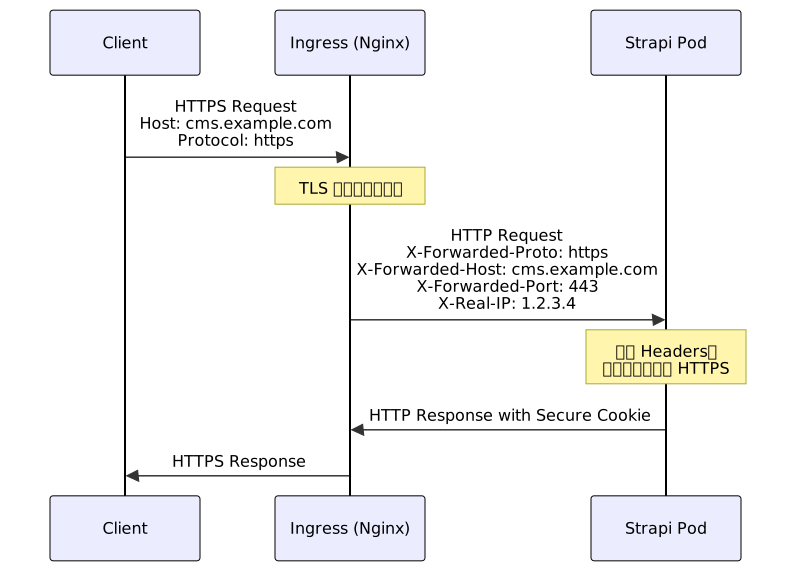
常見的 Forwarded Headers 包括:
| Header | 說明 | 範例值 |
|---|---|---|
X-Forwarded-Proto | 原始協定 | https 或 http |
X-Forwarded-Host | 原始 Host | cms.example.com |
X-Forwarded-Port | 原始埠號 | 443 或 80 |
X-Forwarded-For | 原始 IP 位址(可能有多個) | 1.2.3.4, 5.6.7.8 |
X-Real-IP | 真實 IP(通常是第一個) | 1.2.3.4 |
Forwarded | RFC 7239 標準格式 | for=1.2.3.4;proto=https;host=cms.example.com |
但這裡有個安全問題:這些 Headers 可以被偽造。如果 Strapi 無條件信任這些 Headers,惡意使用者可以自己加入 X-Forwarded-Proto: https 來欺騙應用。
因此,Strapi(底層使用 Koa.js)預設不信任 Forwarded Headers,除非明確啟用 Proxy Trust Mode。
問題拆解:錯誤發生的完整時序
現在讓我們完整重現錯誤發生的過程:
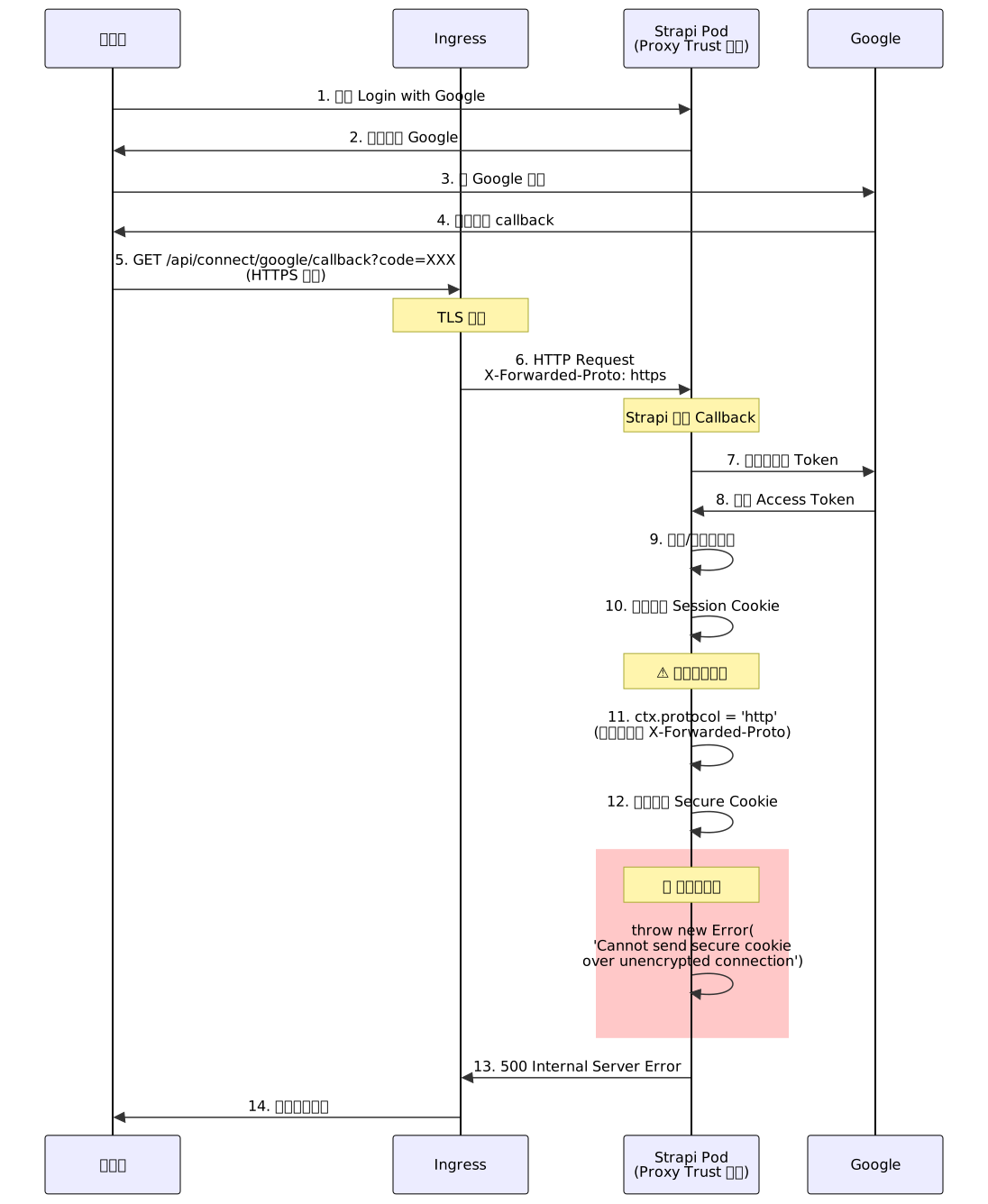
關鍵點在於第 11 步:
- Strapi 使用 Koa.js 的
ctx.protocol來判斷協定 - 但因為 Proxy Trust 關閉,Koa 不讀取
X-Forwarded-Proto - 所以
ctx.protocol回傳'http'(因為 Pod 收到的確實是 HTTP) - 當嘗試設定
SecureCookie 時,Koa 檢查到協定不是https,拋出錯誤
Cookie 安全屬性詳解
在解決問題之前,我們需要理解 Cookie 的安全屬性。現代瀏覽器支援多種 Cookie 屬性來提升安全性:

Cookie 屬性說明
| 屬性 | 說明 | 安全影響 |
|---|---|---|
| Secure | 只在 HTTPS 連線中傳輸 | ✅ 防止中間人攻擊(MITM)竊取 Cookie |
| HttpOnly | 無法透過 JavaScript 讀取 | ✅ 防止 XSS 攻擊竊取 Cookie |
| SameSite | 限制跨站請求是否帶 Cookie | ✅ 防止 CSRF 攻擊 |
| ├─ Strict | 完全禁止跨站請求帶 Cookie | 最嚴格,但可能影響使用者體驗 |
| ├─ Lax | 允許 GET 導航請求帶 Cookie | 平衡安全與體驗(預設值) |
| └─ None | 允許所有跨站請求 | ⚠️ 必須同時設定 Secure |
| Domain | Cookie 的有效網域 | 設定錯誤可能導致 Cookie 無法傳送 |
| Path | Cookie 的有效路徑 | 預設為 /,限制可減少暴露面 |
| Max-Age | Cookie 存活時間(秒) | Session Cookie 預設關閉瀏覽器即失效 |
| Expires | Cookie 過期時間戳 | 與 Max-Age 擇一使用 |
Strapi Session Cookie 預設值
Strapi 的 Session Cookie 預設設定如下:
{
  httpOnly: true,        // 防止 XSS 竊取
  secure: true,          // 只在 HTTPS 傳輸(這就是問題點!)
  sameSite: 'lax',       // 防止 CSRF 攻擊
  signed: true,          // 使用 APP_KEYS 簽章
  maxAge: 86400000       // 1 天(毫秒)
}
解決方案一:啟用 Strapi Proxy Trust Mode(推薦)
這是最正確的解決方案,讓 Strapi 信任來自 Ingress 的 Forwarded Headers。
步驟 1:修改 Strapi 設定檔
編輯 config/server.js(或 config/server.ts):
export default ({ env }) => ({
  host: env('HOST', '0.0.0.0'),
  port: env.int('PORT', 1337),

  // ✅ 關鍵設定:啟用 Koa Proxy Trust
  proxy: {
    enabled: true,      // 啟用 Proxy 模式
    koa: true,          // 信任 X-Forwarded-* headers
  },

  // 設定公開 URL(會影響生成的 URL)
  url: env('PUBLIC_URL', 'https://cms.example.com'),

  app: {
    keys: env.array('APP_KEYS'),
  },

  // Webhook 設定(如果有使用)
  webhooks: {
    populateRelations: env.bool('WEBHOOKS_POPULATE_RELATIONS', false),
  },
});
步驟 2:設定環境變數
在 Kubernetes ConfigMap 或 Secret 中設定:
apiVersion: v1
kind: ConfigMap
metadata:
  name: strapi-config
  namespace: production
data:
  HOST: "0.0.0.0"
  PORT: "1337"
  PUBLIC_URL: "https://cms.example.com"
  NODE_ENV: "production"
步驟 3:設定 Ingress Annotations
確保 Nginx Ingress Controller 傳送正確的 Headers:
apiVersion: networking.k8s.io/v1
kind: Ingress
metadata:
  name: strapi-ingress
  namespace: production
  annotations:
    # ✅ 強制使用 HTTPS
    nginx.ingress.kubernetes.io/force-ssl-redirect: "true"

    # ✅ 啟用 Forwarded Headers
    nginx.ingress.kubernetes.io/use-forwarded-headers: "true"

    # ✅ 設定真實 IP(用於日誌和速率限制)
    nginx.ingress.kubernetes.io/enable-real-ip: "true"

    # 如果使用 cert-manager 自動管理 SSL
    cert-manager.io/cluster-issuer: "letsencrypt-prod"

    # Proxy 緩衝設定(Strapi 上傳大檔案時需要)
    nginx.ingress.kubernetes.io/proxy-body-size: "100m"

spec:
  ingressClassName: nginx
  tls:
    - hosts:
        - cms.example.com
      secretName: strapi-tls-cert
  rules:
    - host: cms.example.com
      http:
        paths:
          - path: /
            pathType: Prefix
            backend:
              service:
                name: strapi-svc
                port:
                  number: 1337
步驟 4:驗證設定
部署後,可以透過以下方式驗證:
# 1. 查看 Strapi Pod 日誌
kubectl logs -n production deployment/strapi --tail=100

# 2. 進入 Pod 檢查環境變數
kubectl exec -n production deployment/strapi -it -- env | grep PUBLIC_URL

# 3. 測試 OAuth 流程
# 瀏覽器開啟 https://cms.example.com/admin
# 點擊「Login with Google」
# 檢查瀏覽器開發者工具 Network 頁籤:
#   - 確認 callback 回應為 302 重導向(不是 500)
#   - 確認 Set-Cookie header 包含 Secure 屬性

# 4. 檢查 Ingress 轉發的 Headers(從 Pod 內部)
kubectl exec -n production deployment/strapi -it -- sh
# 在 Pod 內執行:
apk add curl
curl -H "Host: cms.example.com" http://localhost:1337/admin
# 檢查回應,確認沒有錯誤
解決方案二:調整 Session Cookie 設定(僅測試環境)
如果只是在本機或測試環境遇到問題,可以暫時關閉 Secure Cookie 要求。
方法 A:修改 Middleware 設定
建立或編輯 config/middlewares.js(或 .ts):
export default [
  'strapi::logger',
  'strapi::errors',
  'strapi::security',
  'strapi::cors',
  'strapi::poweredBy',
  'strapi::query',
  'strapi::body',
  'strapi::session',   // 先保留預設
  'strapi::favicon',
  'strapi::public',
];
修改為自訂設定:
export default [
  'strapi::logger',
  'strapi::errors',
  'strapi::security',
  'strapi::cors',
  'strapi::poweredBy',
  'strapi::query',
  'strapi::body',

  // ⚠️ 自訂 Session 設定(僅開發環境!)
  {
    name: 'strapi::session',
    config: {
      cookie: {
        secure: false,       // 關閉 Secure 要求
        httpOnly: true,      // 仍然防止 XSS
        sameSite: 'lax',     // 仍然防止 CSRF
        maxAge: 86400000,    // 1 天
      },
    },
  },

  'strapi::favicon',
  'strapi::public',
];
方法 B:根據環境動態調整
更好的做法是根據 NODE_ENV 自動切換:
export default ({ env }) => {
  const isProduction = env('NODE_ENV') === 'production';

  return [
    'strapi::logger',
    'strapi::errors',
    'strapi::security',
    'strapi::cors',
    'strapi::poweredBy',
    'strapi::query',
    'strapi::body',
    {
      name: 'strapi::session',
      config: {
        cookie: {
          secure: isProduction,  // ✅ 生產環境啟用,開發環境關閉
          httpOnly: true,
          sameSite: 'lax',
          maxAge: 86400000,
        },
      },
    },
    'strapi::favicon',
    'strapi::public',
  ];
};
⚠️ 警告:這個方法只適合本機開發或內部測試環境,絕對不要在生產環境關閉 Secure Cookie!
解決方案三:Ingress 層級重寫(不推薦)
理論上可以在 Ingress 層級設定 Cookie,但這會破壞應用層的控制權,強烈不推薦。
# ❌ 不推薦的做法
metadata:
  annotations:
    nginx.ingress.kubernetes.io/configuration-snippet: |
      proxy_cookie_path / "/; Secure; HttpOnly; SameSite=Lax";
問題:
- Strapi 無法控制 Cookie 的生命週期
- 可能與應用層設定衝突
- 難以偵錯和維護
Google Cloud Console 設定
除了 Kubernetes 和 Strapi 設定,還需要在 Google Cloud Console 正確設定 OAuth 2.0 憑證。
步驟 1:建立 OAuth 2.0 憑證
- 前往 Google Cloud Console
- 選擇你的專案(或建立新專案)
- 左側選單:APIs & Services > Credentials
- 點擊 Create Credentials > OAuth client ID
- Application type 選擇:Web application
- 設定名稱,例如:
Strapi CMS - Production
步驟 2:設定 Authorized Redirect URIs
這是最容易出錯的部分! Redirect URI 必須與實際 callback URL 完全一致。
正確範例:
✅ https://cms.example.com/api/connect/google/callback
✅ https://staging-cms.example.com/api/connect/google/callback
✅ http://localhost:1337/api/connect/google/callback  (本機開發)

錯誤範例:
❌ https://cms.example.com/api/connect/google/callback/  (多了斜線)
❌ https://cms.example.com/connect/google/callback       (少了 /api)
❌ http://cms.example.com/api/connect/google/callback    (http vs https)
❌ https://www.cms.example.com/api/connect/google/callback  (多了 www)
常見錯誤訊息:
Error: redirect_uri_mismatch
這表示 callback URL 與 Google Console 設定不符。
步驟 3:取得 Client ID 和 Client Secret
建立完成後,Google 會顯示:
Client ID: 123456789-abc123def456.apps.googleusercontent.com
Client Secret: GOCSPX-aBcDeFgHiJkLmNoPqRsTuVwXyZ
將這兩個值保存到 Kubernetes Secret:
kubectl create secret generic strapi-google-oauth \
  --from-literal=GOOGLE_CLIENT_ID='123456789-abc123def456.apps.googleusercontent.com' \
  --from-literal=GOOGLE_CLIENT_SECRET='GOCSPX-aBcDeFgHiJkLmNoPqRsTuVwXyZ' \
  -n production
步驟 4:在 Strapi 啟用 Google Provider
登入 Strapi Admin:
https://cms.example.com/adminSettings > Users & Permissions Plugin > Providers
點擊 Google
設定:
- Enable: ✅ 開啟
- Client ID:
${GOOGLE_CLIENT_ID}(會從環境變數讀取) - Client Secret:
${GOOGLE_CLIENT_SECRET} - The redirect URL to your front-end app:
https://cms.example.com/admin(登入成功後要跳轉的頁面)
點擊 Save
完整部署架構
現在讓我們看看完整的生產環境部署架構:

完整的 Kubernetes Manifests 範例
1. ConfigMap
apiVersion: v1
kind: ConfigMap
metadata:
  name: strapi-config
  namespace: production
data:
  # Server 設定
  HOST: "0.0.0.0"
  PORT: "1337"
  PUBLIC_URL: "https://cms.example.com"

  # 環境
  NODE_ENV: "production"

  # 資料庫連線(非敏感部分)
  DATABASE_CLIENT: "postgres"
  DATABASE_HOST: "postgres-svc"
  DATABASE_PORT: "5432"
  DATABASE_NAME: "strapi"
2. Secrets
apiVersion: v1
kind: Secret
metadata:
  name: strapi-secrets
  namespace: production
type: Opaque
stringData:
  # 資料庫密碼
  DATABASE_PASSWORD: "your-secure-password"

  # Strapi App Keys(用於 Cookie 簽章)
  APP_KEYS: "key1,key2,key3,key4"

  # JWT Secret
  JWT_SECRET: "your-jwt-secret"
  API_TOKEN_SALT: "your-api-token-salt"
  ADMIN_JWT_SECRET: "your-admin-jwt-secret"
  TRANSFER_TOKEN_SALT: "your-transfer-token-salt"
---
apiVersion: v1
kind: Secret
metadata:
  name: strapi-google-oauth
  namespace: production
type: Opaque
stringData:
  GOOGLE_CLIENT_ID: "123456789-abc123def456.apps.googleusercontent.com"
  GOOGLE_CLIENT_SECRET: "GOCSPX-aBcDeFgHiJkLmNoPqRsTuVwXyZ"
3. Deployment
apiVersion: apps/v1
kind: Deployment
metadata:
  name: strapi
  namespace: production
spec:
  replicas: 3
  selector:
    matchLabels:
      app: strapi
  template:
    metadata:
      labels:
        app: strapi
    spec:
      containers:
      - name: strapi
        image: your-registry/strapi:latest
        ports:
        - containerPort: 1337
          name: http

        # 環境變數來自 ConfigMap
        envFrom:
        - configMapRef:
            name: strapi-config
        - secretRef:
            name: strapi-secrets
        - secretRef:
            name: strapi-google-oauth

        # 健康檢查
        livenessProbe:
          httpGet:
            path: /_health
            port: 1337
          initialDelaySeconds: 60
          periodSeconds: 10
          timeoutSeconds: 5
          failureThreshold: 3

        readinessProbe:
          httpGet:
            path: /_health
            port: 1337
          initialDelaySeconds: 30
          periodSeconds: 5
          timeoutSeconds: 3
          failureThreshold: 3

        # 資源限制
        resources:
          requests:
            memory: "512Mi"
            cpu: "250m"
          limits:
            memory: "1Gi"
            cpu: "500m"

        # 掛載上傳檔案的儲存空間
        volumeMounts:
        - name: uploads
          mountPath: /opt/app/public/uploads

      volumes:
      - name: uploads
        persistentVolumeClaim:
          claimName: strapi-uploads-pvc
4. Service
apiVersion: v1
kind: Service
metadata:
  name: strapi-svc
  namespace: production
spec:
  selector:
    app: strapi
  ports:
  - port: 1337
    targetPort: 1337
    name: http
  type: ClusterIP
5. Ingress
apiVersion: networking.k8s.io/v1
kind: Ingress
metadata:
  name: strapi-ingress
  namespace: production
  annotations:
    # SSL 設定
    cert-manager.io/cluster-issuer: "letsencrypt-prod"
    nginx.ingress.kubernetes.io/force-ssl-redirect: "true"

    # Proxy Headers
    nginx.ingress.kubernetes.io/use-forwarded-headers: "true"
    nginx.ingress.kubernetes.io/enable-real-ip: "true"

    # 檔案上傳大小限制
    nginx.ingress.kubernetes.io/proxy-body-size: "100m"

    # Timeout 設定(Strapi 建置可能較久)
    nginx.ingress.kubernetes.io/proxy-read-timeout: "600"
    nginx.ingress.kubernetes.io/proxy-send-timeout: "600"

spec:
  ingressClassName: nginx
  tls:
  - hosts:
    - cms.example.com
    secretName: strapi-tls-cert
  rules:
  - host: cms.example.com
    http:
      paths:
      - path: /
        pathType: Prefix
        backend:
          service:
            name: strapi-svc
            port:
              number: 1337
問題排查流程
當 Google OAuth 登入失敗時,可以按照這個流程系統化地排查問題:

常見錯誤與解決方法
錯誤 1:Cannot send secure cookie over unencrypted connection
原因:Strapi 不信任 X-Forwarded-Proto header
解決方法:
// config/server.js
export default ({ env }) => ({
  proxy: { koa: true },  // ✅ 啟用這個
  url: env('PUBLIC_URL', 'https://cms.example.com'),
});
錯誤 2:redirect_uri_mismatch
完整錯誤訊息:
Error: redirect_uri_mismatch
The redirect URI in the request, https://cms.example.com/api/connect/google/callback, does not match the ones authorized for the OAuth client.
原因:Google Console 的 Authorized Redirect URIs 與實際 callback URL 不符
解決方法:
- 前往 Google Cloud Console > APIs & Services > Credentials
- 編輯 OAuth 2.0 Client ID
- 確保 Authorized Redirect URIs 包含:
https://cms.example.com/api/connect/google/callback - 注意:必須完全一致,包括
https://、網域、路徑
錯誤 3:Missing required parameter: client_id
原因:環境變數未正確設定或 Strapi Provider 設定錯誤
解決方法:
# 檢查環境變數
kubectl exec -n production deployment/strapi -- env | grep GOOGLE

# 應該看到:
# GOOGLE_CLIENT_ID=123456789-abc123def456.apps.googleusercontent.com
# GOOGLE_CLIENT_SECRET=GOCSPX-...
如果變數存在但仍報錯,檢查 Strapi Admin 的 Provider 設定:
- Settings > Users & Permissions > Providers > Google
- 確認 Client ID 欄位是
${GOOGLE_CLIENT_ID}而非空白
錯誤 4:Could not retrieve provider profile from the provider
原因:無法從 Google 取得使用者資料,可能是 Access Token 無效
常見情況:
- Client Secret 設定錯誤
- Google API 權限問題
- Token 過期
解決方法:
# 1. 確認 Client Secret 正確
kubectl get secret strapi-google-oauth -n production -o yaml

# 2. 檢查 Google Console 是否啟用必要的 API
# - People API
# - Google+ API (如果使用舊版)

# 3. 查看詳細的 Strapi 日誌
kubectl logs -n production deployment/strapi --tail=200 | grep -A 10 "provider profile"
錯誤 5:Ingress 回傳 502 Bad Gateway
原因:Strapi Pod 尚未就緒或健康檢查失敗
解決方法:
# 檢查 Pod 狀態
kubectl get pods -n production -l app=strapi

# 檢查 Pod 詳細資訊
kubectl describe pod -n production <pod-name>

# 查看日誌
kubectl logs -n production <pod-name> --tail=100

# 常見原因:
# 1. 資料庫連線失敗 -> 檢查 DATABASE_PASSWORD
# 2. APP_KEYS 格式錯誤 -> 確保是逗號分隔的字串
# 3. 健康檢查路徑錯誤 -> Strapi 預設是 /_health
測試與驗證
1. 本機測試(Docker Compose)
在部署到 Kubernetes 之前,可以先用 Docker Compose 測試:
# docker-compose.yml
version: '3.8'

services:
  strapi:
    image: strapi/strapi:latest
    environment:
      - HOST=0.0.0.0
      - PORT=1337
      - PUBLIC_URL=https://localhost:1337
      - NODE_ENV=development
      - DATABASE_CLIENT=postgres
      - DATABASE_HOST=postgres
      - DATABASE_PORT=5432
      - DATABASE_NAME=strapi
      - DATABASE_USERNAME=strapi
      - DATABASE_PASSWORD=strapi
      - GOOGLE_CLIENT_ID=your-client-id
      - GOOGLE_CLIENT_SECRET=your-client-secret
    volumes:
      - ./app:/srv/app
    ports:
      - "1337:1337"
    depends_on:
      - postgres

  postgres:
    image: postgres:14-alpine
    environment:
      - POSTGRES_DB=strapi
      - POSTGRES_USER=strapi
      - POSTGRES_PASSWORD=strapi
    volumes:
      - db-data:/var/lib/postgresql/data

volumes:
  db-data:
注意:本機測試時需要在 Google Console 加入 http://localhost:1337/api/connect/google/callback
2. 驗證 Proxy Headers
建立一個測試端點來檢查 Strapi 收到的 Headers:
// src/api/test/routes/test.js
module.exports = {
  routes: [
    {
      method: 'GET',
      path: '/test/headers',
      handler: 'test.headers',
      config: {
        auth: false,
      },
    },
  ],
};

// src/api/test/controllers/test.js
module.exports = {
  async headers(ctx) {
    return {
      protocol: ctx.protocol,
      host: ctx.host,
      ip: ctx.ip,
      headers: {
        'x-forwarded-proto': ctx.get('X-Forwarded-Proto'),
        'x-forwarded-host': ctx.get('X-Forwarded-Host'),
        'x-forwarded-for': ctx.get('X-Forwarded-For'),
        'x-real-ip': ctx.get('X-Real-IP'),
      },
    };
  },
};
部署後訪問 https://cms.example.com/api/test/headers,確認:
protocol:"https"headers.x-forwarded-proto:"https"
3. 完整的 OAuth 流程測試
建立測試檢查清單:
Google Console 設定
- Redirect URI 正確無誤
- Client ID 和 Secret 已複製
- OAuth consent screen 已設定(測試/生產模式)
Kubernetes 設定
- Secret 包含 GOOGLE_CLIENT_ID 和 GOOGLE_CLIENT_SECRET
- ConfigMap 包含正確的 PUBLIC_URL
- Deployment 正確掛載 Secret 和 ConfigMap
- Ingress annotations 包含 use-forwarded-headers
Strapi 設定
- config/server.js 啟用 proxy.koa
- Admin > Settings > Providers > Google 已啟用
- Provider 設定使用 ${GOOGLE_CLIENT_ID} 變數
端到端測試
- 訪問 https://cms.example.com/admin
- 點擊「Login with Google」
- 正確跳轉到 Google 授權頁
- 授權後成功跳轉回 Strapi
- 成功登入,顯示使用者資訊
- 重新整理頁面,Session 仍然有效
安全最佳實踐
1. 使用 Kubernetes Secrets 管理敏感資訊
# ✅ 正確:使用 Secret
kubectl create secret generic strapi-google-oauth \
  --from-literal=GOOGLE_CLIENT_ID='...' \
  --from-literal=GOOGLE_CLIENT_SECRET='...'

# ❌ 錯誤:寫在 ConfigMap 中(明文)
2. 限制 OAuth 的 Scope
在 Strapi Provider 設定中,可以限制要求的權限:
// config/plugins.js
export default {
  'users-permissions': {
    config: {
      providers: {
        google: {
          enabled: true,
          scope: ['email', 'profile'],  // 只要求基本資料
        },
      },
    },
  },
};
3. 實施 Rate Limiting
防止暴力破解或濫用:
# Ingress annotations
nginx.ingress.kubernetes.io/rate-limit: "10"
nginx.ingress.kubernetes.io/rate-limit-burst: "20"
4. 啟用 HSTS(HTTP Strict Transport Security)
強制瀏覽器只使用 HTTPS:
# Ingress annotations
nginx.ingress.kubernetes.io/hsts: "true"
nginx.ingress.kubernetes.io/hsts-max-age: "31536000"
nginx.ingress.kubernetes.io/hsts-include-subdomains: "true"
5. 設定 Content Security Policy
在 Strapi 的 middleware 中設定 CSP:
// config/middlewares.js
export default [
  // ...
  {
    name: 'strapi::security',
    config: {
      contentSecurityPolicy: {
        directives: {
          'default-src': ["'self'"],
          'script-src': ["'self'", "'unsafe-inline'", 'https://accounts.google.com'],
          'frame-src': ["'self'", 'https://accounts.google.com'],
          'connect-src': ["'self'", 'https://accounts.google.com'],
        },
      },
    },
  },
  // ...
];
6. 定期輪換 Secrets
# 建立新的 Client Secret(在 Google Console)
# 更新 Kubernetes Secret
kubectl create secret generic strapi-google-oauth \
  --from-literal=GOOGLE_CLIENT_SECRET='new-secret' \
  --dry-run=client -o yaml | kubectl apply -f -

# 重啟 Pod 套用新設定
kubectl rollout restart deployment strapi -n production
多環境管理策略
在實際專案中,通常會有多個環境(Development、Staging、Production),每個環境都需要獨立的 OAuth 設定。
環境隔離架構

Kustomize 多環境設定
使用 Kustomize 管理不同環境的差異:
# 目錄結構
k8s/
├── base/
│   ├── kustomization.yaml
│   ├── deployment.yaml
│   ├── service.yaml
│   └── ingress.yaml
├── overlays/
│   ├── staging/
│   │   ├── kustomization.yaml
│   │   ├── configmap.yaml
│   │   └── secrets.yaml (加密)
│   └── production/
│       ├── kustomization.yaml
│       ├── configmap.yaml
│       └── secrets.yaml (加密)
base/kustomization.yaml:
apiVersion: kustomize.config.k8s.io/v1beta1
kind: Kustomization

resources:
  - deployment.yaml
  - service.yaml
  - ingress.yaml
overlays/production/kustomization.yaml:
apiVersion: kustomize.config.k8s.io/v1beta1
kind: Kustomization

namespace: production

bases:
  - ../../base

resources:
  - configmap.yaml
  - secrets.yaml

patchesStrategicMerge:
  - patch-ingress.yaml

images:
  - name: strapi
    newName: your-registry/strapi
    newTag: v1.2.3
部署命令:
# Staging
kubectl apply -k k8s/overlays/staging

# Production
kubectl apply -k k8s/overlays/production
監控與告警
1. 設定 Prometheus Metrics
Strapi 可以透過 middleware 暴露 metrics:
// config/middlewares.js
const promClient = require('prom-client');

// 建立 metrics registry
const register = new promClient.Register();

// 定義自訂 metrics
const oauthSuccessCounter = new promClient.Counter({
  name: 'strapi_oauth_success_total',
  help: 'Total number of successful OAuth logins',
  labelNames: ['provider'],
  registers: [register],
});

const oauthFailureCounter = new promClient.Counter({
  name: 'strapi_oauth_failure_total',
  help: 'Total number of failed OAuth logins',
  labelNames: ['provider', 'error_type'],
  registers: [register],
});

module.exports = [
  // ... 其他 middlewares
  {
    name: 'strapi::metrics',
    config: {
      path: '/metrics',
      handler: async (ctx) => {
        ctx.body = await register.metrics();
        ctx.type = 'text/plain';
      },
    },
  },
];
2. Grafana Dashboard
建立 Dashboard 監控 OAuth 登入狀況:
- OAuth 成功/失敗次數(每小時)
- 回應時間分布
- 錯誤類型分布
- 各 Provider 使用率
3. 告警規則
在 Prometheus 設定告警規則:
groups:
  - name: strapi_oauth
    interval: 1m
    rules:
      - alert: HighOAuthFailureRate
        expr: |
          rate(strapi_oauth_failure_total[5m]) > 0.1
        for: 5m
        labels:
          severity: warning
        annotations:
          summary: "High OAuth failure rate detected"
          description: "OAuth failure rate is {{ $value }} per second"

      - alert: OAuthCompletelyBroken
        expr: |
          rate(strapi_oauth_success_total[10m]) == 0
          AND
          rate(strapi_oauth_failure_total[10m]) > 0
        for: 10m
        labels:
          severity: critical
        annotations:
          summary: "OAuth completely broken - no successful logins"
效能優化
1. Session Storage
預設 Strapi 使用記憶體儲存 Session,多 Pod 環境會有問題。建議改用 Redis:
// config/middlewares.js
const Redis = require('ioredis');
const redisStore = require('koa-redis');

const redisClient = new Redis({
  host: process.env.REDIS_HOST || 'redis-svc',
  port: process.env.REDIS_PORT || 6379,
  password: process.env.REDIS_PASSWORD,
  db: 0,
});

module.exports = [
  // ...
  {
    name: 'strapi::session',
    config: {
      store: redisStore({ client: redisClient }),
      cookie: {
        secure: true,
        httpOnly: true,
        sameSite: 'lax',
        maxAge: 86400000,
      },
    },
  },
];
2. Token Caching
避免每次請求都驗證 JWT,可以使用 Redis 快取驗證結果。
3. Database Connection Pooling
// config/database.js
export default ({ env }) => ({
  connection: {
    client: 'postgres',
    connection: {
      host: env('DATABASE_HOST'),
      port: env.int('DATABASE_PORT'),
      database: env('DATABASE_NAME'),
      user: env('DATABASE_USERNAME'),
      password: env('DATABASE_PASSWORD'),
      ssl: env.bool('DATABASE_SSL', false),
    },
    pool: {
      min: 2,
      max: 10,
      acquireTimeoutMillis: 30000,
      idleTimeoutMillis: 30000,
    },
  },
});
常見問題 Q&A
Q1: 為什麼本機可以登入,部署到 Kubernetes 就失敗?
A: 這是因為本機環境通常直接連到 Strapi(http://localhost:1337),而 Kubernetes 有 Ingress 層的 TLS 終止。需要啟用 Strapi 的 Proxy Trust 模式。
Q2: 可以同時支援多個 OAuth Provider 嗎?
A: 可以!Strapi 支援多個 Provider(Google、Facebook、GitHub、Twitter 等),每個 Provider 都有獨立的設定。使用者可以選擇任一方式登入。
Q3: OAuth 登入後如何自動建立使用者?
A: Strapi 會自動處理。首次 OAuth 登入時,會在 users collection 建立新記錄,email 來自 OAuth provider。可以在 bootstrap.js 中自訂邏輯:
// src/index.js
module.exports = {
  async bootstrap({ strapi }) {
    // 監聽 OAuth 使用者建立事件
    strapi.db.lifecycles.subscribe({
      models: ['plugin::users-permissions.user'],
      async afterCreate(event) {
        const { result } = event;
        if (result.provider === 'google') {
          // 自訂邏輯:發送歡迎信、指派預設角色等
          console.log('New Google user:', result.email);
        }
      },
    });
  },
};
Q4: 如何限制只有特定 domain 的 Google 帳號可以登入?
A: 可以在 OAuth callback 處理中加入驗證:
// src/extensions/users-permissions/strapi-server.js
module.exports = (plugin) => {
  const originalConnect = plugin.controllers.auth.callback;

  plugin.controllers.auth.callback = async (ctx) => {
    // 執行原本的 OAuth 流程
    await originalConnect(ctx);

    // 檢查使用者 email domain
    const user = ctx.state.user;
    if (user && user.email && !user.email.endsWith('@yourcompany.com')) {
      ctx.unauthorized('Only company emails are allowed');
    }
  };

  return plugin;
};
Q5: Session Cookie 一直過期怎麼辦?
A: 檢查以下幾點:
- Cookie 的
maxAge設定(預設 24 小時) - 如果有多個 Pod,確保使用共享的 Session Storage(如 Redis)
- 檢查瀏覽器是否封鎖 Third-party Cookies
- 確認時區設定正確(Server 與 Client 時間差可能導致問題)
Q6: 如何在前端實作「Login with Google」按鈕?
A: Strapi 提供標準的 REST API:
// React 範例
function GoogleLoginButton() {
  const handleLogin = () => {
    // 重導向到 Strapi 的 Google OAuth 端點
    window.location.href = 'https://cms.example.com/api/connect/google';
  };

  return (
    <button onClick={handleLogin}>
      Login with Google
    </button>
  );
}
Strapi 會處理整個 OAuth 流程,最後重導向回 redirect 參數指定的頁面(或 Provider 設定的預設頁面),並在 URL 中帶著 access_token:
https://your-frontend.com/auth/callback?access_token=eyJhbGc...
前端再用這個 token 呼叫 Strapi API。
Q7: 生產環境一定要用 HTTPS 嗎?
A: 是的,絕對必要! 原因:
- Google OAuth 要求 Redirect URI 必須是 HTTPS(本機 localhost 例外)
- Secure Cookie 只能在 HTTPS 傳輸
- 防止中間人攻擊竊取使用者資料
- 現代瀏覽器對 HTTP 網站有諸多限制(Service Worker、Geolocation 等)
建議使用 cert-manager + Let’s Encrypt 自動管理 SSL 憑證。
總結
整合 Google OAuth 到 Kubernetes 上的 Strapi,表面上是個簡單的功能,實際上牽涉到:
- OAuth 2.0 協定:理解授權碼流程、Token 交換機制
- Kubernetes 網路架構:Ingress、Service、Pod 的流量路徑
- TLS 終止與 Proxy Trust:理解 Reverse Proxy 的運作原理
- Cookie 安全機制:Secure、HttpOnly、SameSite 屬性
- 環境變數管理:Kubernetes ConfigMap、Secret 的最佳實踐
- 多環境部署:Development、Staging、Production 的隔離策略
這次踩坑的核心問題是:Strapi 預設不信任來自 Ingress 的 X-Forwarded-Proto header,導致它認為連線是 HTTP,拒絕設定 Secure Cookie。
解決方案很簡單:在 config/server.js 加入 proxy: { koa: true },並確保 Ingress 正確傳送 Forwarded Headers。
但更重要的是理解背後的原理:
- 為什麼需要 Proxy Trust?(安全性與正確性的平衡)
- Forwarded Headers 的意義?(保留原始請求資訊)
- Cookie 安全屬性的作用?(防止各種攻擊)
- Kubernetes 網路層的運作?(TLS 終止、負載平衡)
希望這篇文章能幫助你在 Kubernetes 上順利部署 Strapi + Google OAuth,並在遇到問題時快速定位原因!