
引言:為什麼需要 Redux?
在 iOS 開發中,隨著應用規模擴大,狀態管理逐漸成為最具挑戰性的課題。當多個 View 需要共享狀態、狀態變化難以追蹤時,應用很容易陷入混亂。
Redux 作為一種可預測的狀態容器,最早在 JavaScript 生態系中流行,如今也廣泛應用於 Swift/iOS 專案。本文將深入介紹 Redux 架構的核心觀念,包含:
- Reducer(減少器):狀態更新的核心邏輯
- Store(儲存區):應用的單一狀態來源
- Action(動作):描述「發生什麼事」的指令
- Middleware(中介層):處理非同步與副作用
Redux 核心架構概覽
架構組成

架構特性:
- ✅ 單向資料流:資料流向可預測
- ✅ 單一狀態來源:整個應用只有一個 State 樹
- ✅ 狀態不可變:不直接修改 State,而是創建新 State
- ✅ 可測試性高:Reducer 是純函數,易於測試
核心概念 1:State(狀態)
State 是什麼?
State 是整個應用的單一資料來源(Single Source of Truth)。它通常是一個 struct,描述當前應用的完整狀態。
實作範例
// AppState.swift
struct AppState {
    // 購物車
    var cartItems: [CartItem] = []
    var totalAmount: Decimal = 0.0

    // 用戶資訊
    var userProfile: UserProfile?
    var isLoggedIn: Bool = false

    // UI 狀態
    var isLoading: Bool = false
    var errorMessage: String?

    // 套餐選擇
    var packages: [Package] = []
    var selectedPackageId: String?
}

// 購物車商品
struct CartItem: Identifiable {
    let id: String
    let name: String
    let price: Decimal
    var quantity: Int
}

// 用戶資料
struct UserProfile {
    let id: String
    let name: String
    let email: String
}

// 套餐
struct Package: Identifiable {
    let id: String
    let name: String
    let items: [PackageItem]
}

struct PackageItem: Identifiable {
    let id: String
    let name: String
    var quantity: Int
}
設計原則:
- ✅ 使用
struct(值類型)確保不可變性 - ✅ 扁平化設計,避免過深的巢狀結構
- ✅ 符合
Codable協議,便於序列化
核心概念 2:Action(動作)
Action 是什麼?
Action 是一個明確描述「發生了什麼事情」的指令。它通常是一個 enum,並攜帶必要的參數。
實作範例
// AppAction.swift
enum AppAction {
    // 購物車相關
    case updateItemQuantity(itemId: String, quantity: Int)
    case confirmAddToCart
    case clearCart

    // 套餐相關
    case updatePackageItemQuantity(packageId: String, itemId: String, quantity: Int)
    case selectPackage(packageId: String)

    // 用戶相關
    case loginRequest(username: String, password: String)
    case loginSuccess(user: UserProfile)
    case loginFailed(error: String)
    case logout

    // UI 狀態
    case setLoading(Bool)
    case setError(String?)
}
Action 設計原則:
- ✅ 描述性命名:清楚表達「發生什麼事」(例如
loginSuccess而不是login) - ✅ 攜帶必要參數:使用關聯值(Associated Values)
- ✅ 不包含邏輯:Action 只是「事件描述」,不執行任何邏輯
核心概念 3:Reducer(減少器)
Reducer 是什麼?
Reducer 是 Redux 架構的核心,它是一個純函數(Pure Function),負責根據不同的 Action,計算並回傳新的 State。
函數簽名:
(State, Action) -> State
規則:
- ✅ 純函數:相同輸入永遠產生相同輸出
- ✅ 不可變性:不直接修改原 State,而是回傳新 State
- ✅ 無副作用:不進行 API 呼叫、不修改外部變數
完整實作
// AppReducer.swift
func appReducer(state: AppState, action: AppAction) -> AppState {
    var newState = state

    switch action {
    // ============================================
    // 購物車相關
    // ============================================
    case .updateItemQuantity(let itemId, let quantity):
        if let index = newState.cartItems.firstIndex(where: { $0.id == itemId }) {
            if quantity > 0 {
                newState.cartItems[index].quantity = quantity
            } else {
                // 數量為 0,移除商品
                newState.cartItems.remove(at: index)
            }
        }
        // 重新計算總金額
        newState.totalAmount = newState.cartItems.reduce(0) { total, item in
            total + (item.price * Decimal(item.quantity))
        }

    case .confirmAddToCart:
        // 將選中的套餐商品加入購物車
        if let packageId = newState.selectedPackageId,
           let package = newState.packages.first(where: { $0.id == packageId }) {

            for item in package.items where item.quantity > 0 {
                let cartItem = CartItem(
                    id: item.id,
                    name: item.name,
                    price: 10.0, // 假設價格
                    quantity: item.quantity
                )
                newState.cartItems.append(cartItem)
            }

            // 重新計算總金額
            newState.totalAmount = newState.cartItems.reduce(0) { total, item in
                total + (item.price * Decimal(item.quantity))
            }

            // 清空套餐選擇
            newState.selectedPackageId = nil
        }

    case .clearCart:
        newState.cartItems = []
        newState.totalAmount = 0.0

    // ============================================
    // 套餐相關
    // ============================================
    case .updatePackageItemQuantity(let packageId, let itemId, let quantity):
        if let packageIndex = newState.packages.firstIndex(where: { $0.id == packageId }),
           let itemIndex = newState.packages[packageIndex].items.firstIndex(where: { $0.id == itemId }) {
            newState.packages[packageIndex].items[itemIndex].quantity = max(0, quantity)
        }

    case .selectPackage(let packageId):
        newState.selectedPackageId = packageId

    // ============================================
    // 用戶相關
    // ============================================
    case .loginSuccess(let user):
        newState.userProfile = user
        newState.isLoggedIn = true
        newState.isLoading = false
        newState.errorMessage = nil

    case .loginFailed(let error):
        newState.userProfile = nil
        newState.isLoggedIn = false
        newState.isLoading = false
        newState.errorMessage = error

    case .logout:
        newState.userProfile = nil
        newState.isLoggedIn = false
        newState.cartItems = []
        newState.totalAmount = 0.0

    // ============================================
    // UI 狀態
    // ============================================
    case .setLoading(let loading):
        newState.isLoading = loading

    case .setError(let error):
        newState.errorMessage = error

    default:
        break
    }

    return newState
}
為什麼叫 Reducer?
名稱來自 JavaScript 的 Array.reduce() 方法:
// JavaScript 範例
[1, 2, 3, 4].reduce((acc, value) => acc + value, 0)
// 結果: 10
在 Redux 中,我們可以想像狀態的更新過程,就像是一系列的 Action 透過 Reducer「歸納」成最新的應用狀態:
// 概念示意
actions.reduce((當前狀態, 動作) => 新狀態, 初始狀態)
因此 Reducer 就是應用邏輯的「歸納器」。
核心概念 4:Store(儲存區)
Store 是什麼?
Store 是 Redux 的核心容器,負責:
- ✅ 保存應用的狀態樹(State)
- ✅ 提供
dispatch(action:)方法派送 Action - ✅ 呼叫 Reducer 更新狀態
- ✅ 通知 View 狀態變化(透過
@Published)
基本實作
// Store.swift
final class Store: ObservableObject {
    // 使用 @Published 讓 SwiftUI 自動觀察
    @Published private(set) var state: AppState

    // Reducer 函數
    private let reducer: (AppState, AppAction) -> AppState

    init(
        initialState: AppState = AppState(),
        reducer: @escaping (AppState, AppAction) -> AppState
    ) {
        self.state = initialState
        self.reducer = reducer
    }

    // 派送 Action
    func dispatch(_ action: AppAction) {
        print("[Store] Dispatching action: \(action)")
        state = reducer(state, action)
        print("[Store] New state: \(state)")
    }
}
使用範例
// 初始化 Store
let store = Store(
    initialState: AppState(),
    reducer: appReducer
)

// 派送 Action
store.dispatch(.loginRequest(username: "user", password: "pass"))
store.dispatch(.updateItemQuantity(itemId: "123", quantity: 2))
核心概念 5:View(視圖整合)
SwiftUI 整合
在 SwiftUI 中,View 透過 @EnvironmentObject 或 @ObservedObject 監聽 Store 的狀態變化。
完整範例
// App 入口
@main
struct MyApp: App {
    // 建立全域 Store
    @StateObject private var store = Store(
        initialState: AppState(),
        reducer: appReducer,
        middlewares: [loggingMiddleware, apiMiddleware]
    )

    var body: some Scene {
        WindowGroup {
            ContentView()
                .environmentObject(store)
        }
    }
}

// ============================================
// 購物車 View
// ============================================
struct CartView: View {
    @EnvironmentObject var store: Store

    var body: some View {
        List {
            ForEach(store.state.cartItems) { item in
                HStack {
                    Text(item.name)
                    Spacer()
                    Text("\(item.quantity)")

                    Stepper("", value: Binding(
                        get: { item.quantity },
                        set: { newValue in
                            store.dispatch(.updateItemQuantity(
                                itemId: item.id,
                                quantity: newValue
                            ))
                        }
                    ))
                }
            }

            // 總金額
            HStack {
                Text("總計")
                    .font(.headline)
                Spacer()
                Text("$\(store.state.totalAmount)")
                    .font(.headline)
            }
        }
        .navigationTitle("購物車")
    }
}

// ============================================
// 登入 View
// ============================================
struct LoginView: View {
    @EnvironmentObject var store: Store
    @State private var username = ""
    @State private var password = ""

    var body: some View {
        VStack {
            TextField("使用者名稱", text: $username)
                .textFieldStyle(.roundedBorder)
                .padding()

            SecureField("密碼", text: $password)
                .textFieldStyle(.roundedBorder)
                .padding()

            if store.state.isLoading {
                ProgressView()
            } else {
                Button("登入") {
                    store.dispatch(.loginRequest(
                        username: username,
                        password: password
                    ))
                }
                .buttonStyle(.borderedProminent)
            }

            if let error = store.state.errorMessage {
                Text(error)
                    .foregroundColor(.red)
                    .padding()
            }
        }
    }
}
View 設計原則:
- ✅ View 不直接修改 State:所有變更透過
dispatch(action) - ✅ 單向資料流:View → Action → Reducer → State → View
- ✅ 自動更新:
@Published state變化自動觸發 View 重繪
Redux 資料流詳解
完整流程圖
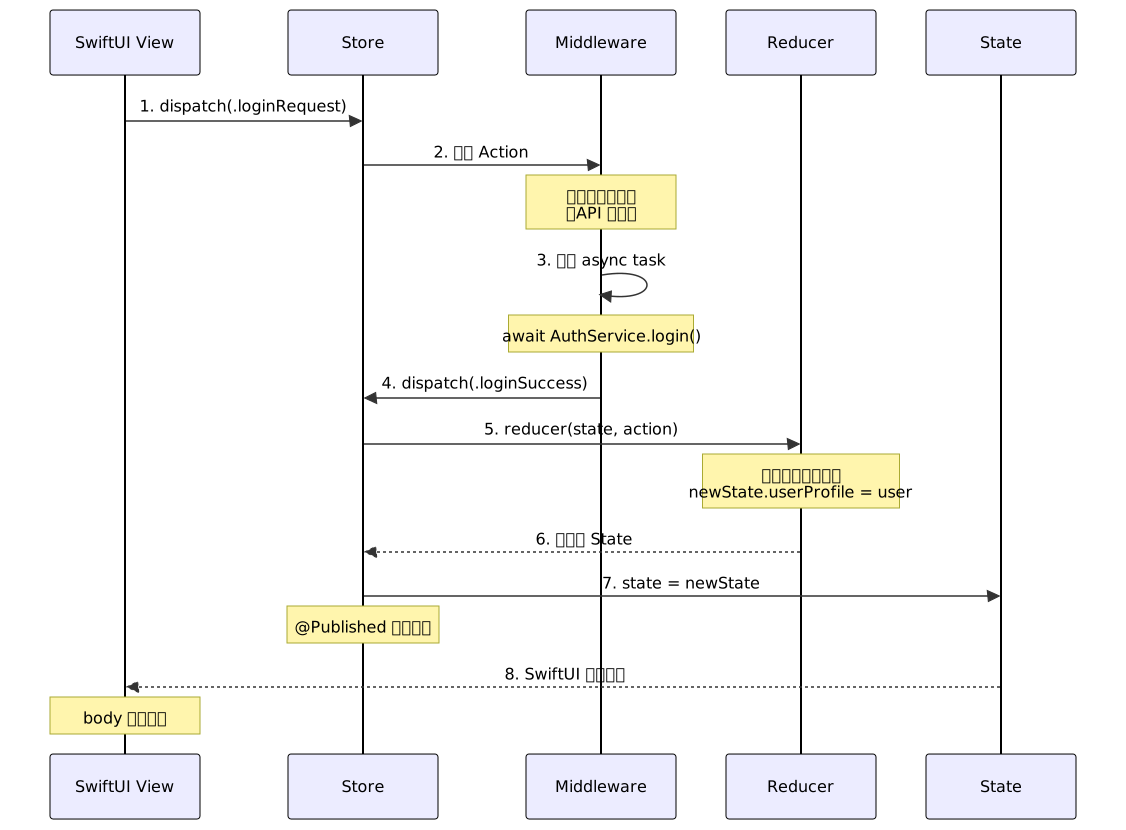
流程說明:
- 用戶操作:點擊「登入」按鈕
- View 派送 Action:
store.dispatch(.loginRequest(...)) - Middleware 攔截:檢查是否需要處理非同步邏輯
- 執行非同步任務:呼叫 API
AuthService.login() - 派送成功 Action:
dispatch(.loginSuccess(user)) - Reducer 計算新狀態:
newState.userProfile = user - Store 更新狀態:
state = newState(觸發@Published) - View 自動重繪:SwiftUI 偵測到
state變化,重新計算body
Middleware(中介層)深入解析
為什麼需要 Middleware?
Reducer 必須是純函數,不能包含副作用(Side Effects):
- ❌ API 呼叫
- ❌ 資料庫存取
- ❌ Timer / 延遲執行
- ❌ 隨機數生成
Middleware 提供了一個安全的地方來處理這些非純函數邏輯。
Middleware 類型定義
// Middleware.swift
typealias Middleware = (
    AppState,                        // 當前狀態
    AppAction,                       // 當前 Action
    @escaping (AppAction) -> Void    // dispatch 函數
) -> Void
實作範例:日誌 Middleware
// LoggingMiddleware.swift
let loggingMiddleware: Middleware = { state, action, dispatch in
    print("━━━━━━━━━━━━━━━━━━━━━━━━━━━━━━━━━━")
    print("📤 [Action] \(action)")
    print("📊 [State Before]")
    print("   - isLoggedIn: \(state.isLoggedIn)")
    print("   - cartItems: \(state.cartItems.count) items")
    print("   - totalAmount: $\(state.totalAmount)")
    print("━━━━━━━━━━━━━━━━━━━━━━━━━━━━━━━━━━")
}
實作範例:API Middleware
// APIMiddleware.swift
let apiMiddleware: Middleware = { state, action, dispatch in
    switch action {
    case .loginRequest(let username, let password):
        // 設定 Loading 狀態
        dispatch(.setLoading(true))

        Task {
            do {
                // 模擬非同步 API 請求
                let user = try await AuthService.login(
                    username: username,
                    password: password
                )

                // 登入成功
                await MainActor.run {
                    dispatch(.loginSuccess(user: user))
                }

            } catch {
                // 登入失敗
                await MainActor.run {
                    dispatch(.loginFailed(error: error.localizedDescription))
                }
            }
        }

    default:
        break
    }
}

// 模擬 Auth Service
struct AuthService {
    static func login(username: String, password: String) async throws -> UserProfile {
        // 模擬網路延遲
        try await Task.sleep(nanoseconds: 1_000_000_000) // 1 秒

        if username == "admin" && password == "password" {
            return UserProfile(
                id: "user123",
                name: "Admin User",
                email: "admin@example.com"
            )
        } else {
            throw NSError(
                domain: "AuthService",
                code: 401,
                userInfo: [NSLocalizedDescriptionKey: "帳號或密碼錯誤"]
            )
        }
    }
}
整合 Middleware 到 Store
// Store.swift(支援 Middleware)
final class Store: ObservableObject {
    @Published private(set) var state: AppState
    private let reducer: (AppState, AppAction) -> AppState
    private let middlewares: [Middleware]

    init(
        initialState: AppState = AppState(),
        reducer: @escaping (AppState, AppAction) -> AppState,
        middlewares: [Middleware] = []
    ) {
        self.state = initialState
        self.reducer = reducer
        self.middlewares = middlewares
    }

    func dispatch(_ action: AppAction) {
        // 1. 先讓 Middleware 處理
        for middleware in middlewares {
            middleware(state, action, dispatch)
        }

        // 2. 再由 Reducer 更新狀態
        state = reducer(state, action)
    }
}
使用範例:
let store = Store(
    initialState: AppState(),
    reducer: appReducer,
    middlewares: [
        loggingMiddleware,  // 日誌記錄
        apiMiddleware       // API 呼叫
    ]
)
複雜場景:串接多個 API 的策略
當需要串接多個 API(例如先登入 → 取得用戶資料 → 載入訂單列表),有三種主流做法:
策略比較

策略 1:巢狀呼叫
流程圖:
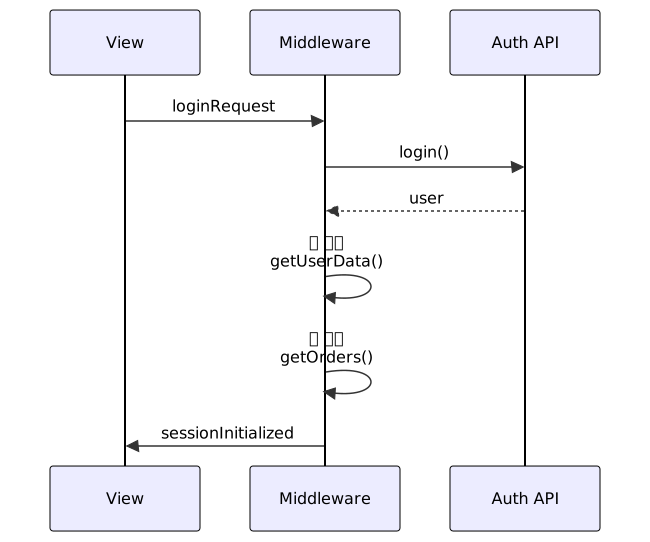
程式碼:
let nestedMiddleware: Middleware = { state, action, dispatch in
    switch action {
    case .loginRequest(let username, let password):
        Task {
            // 1. 登入
            let user = try await AuthService.login(username: username, password: password)
            dispatch(.loginSuccess(user: user))

            // 2. 取得用戶資料(巢狀)
            let userData = try await UserService.getUserData(userId: user.id)
            dispatch(.userDataLoaded(userData))

            // 3. 載入訂單(巢狀)
            let orders = try await OrderService.getOrders(userId: user.id)
            dispatch(.ordersLoaded(orders))
        }
    default:
        break
    }
}
優點:
- ✅ 邏輯集中在一處
缺點:
- ❌ 程式碼層層巢狀,難以維護
- ❌ 錯誤處理複雜
- ❌ 無法單獨測試各階段
策略 2:合併 Action
流程圖:

程式碼:
enum AppAction {
    case initializeUserSession(username: String, password: String)
    case sessionInitialized(user: UserProfile, orders: [Order])
    // ...
}

let combinedMiddleware: Middleware = { state, action, dispatch in
    switch action {
    case .initializeUserSession(let username, let password):
        Task {
            let user = try await AuthService.login(username: username, password: password)
            let userData = try await UserService.getUserData(userId: user.id)
            let orders = try await OrderService.getOrders(userId: user.id)

            // 一次性派發包含所有資料的 Action
            dispatch(.sessionInitialized(user: user, orders: orders))
        }
    default:
        break
    }
}
優點:
- ✅ 流程扁平,一次處理
缺點:
- ❌ Action 語意過於龐大(違反單一職責)
- ❌ 無法追蹤中間狀態
- ❌ 難以在 UI 顯示進度(例如「載入訂單中…」)
策略 3:多層 Middleware(推薦)
流程圖:
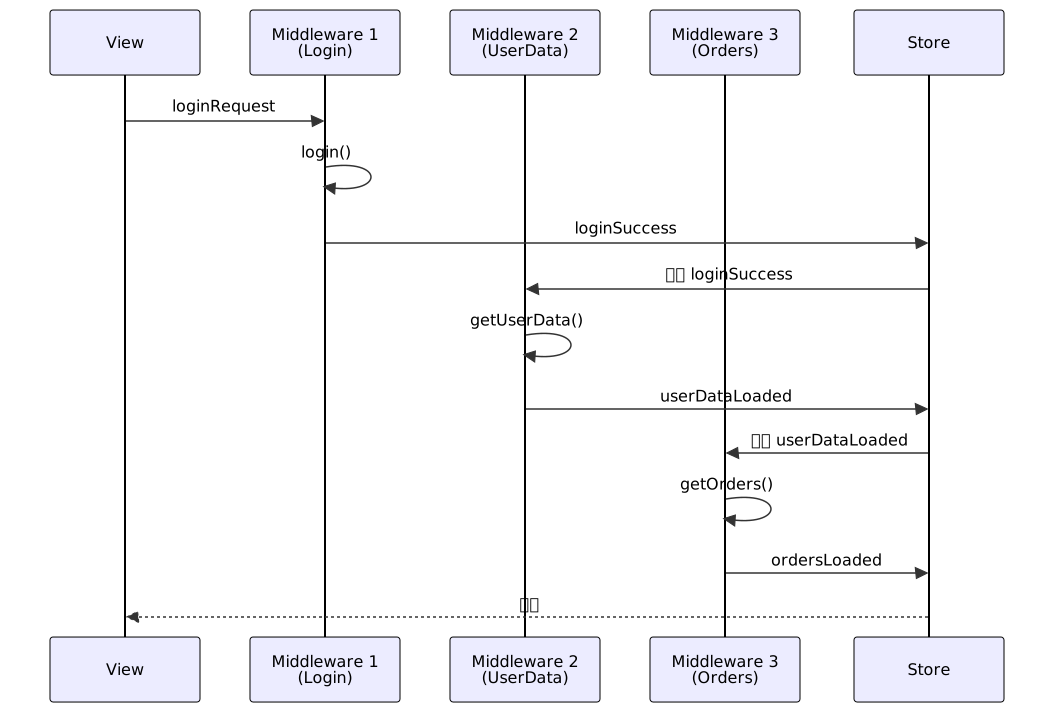
程式碼:
// ============================================
// Middleware 1: 處理登入
// ============================================
let loginMiddleware: Middleware = { state, action, dispatch in
    switch action {
    case .loginRequest(let username, let password):
        dispatch(.setLoading(true))

        Task {
            do {
                let user = try await AuthService.login(username: username, password: password)
                await MainActor.run {
                    dispatch(.loginSuccess(user: user))
                }
            } catch {
                await MainActor.run {
                    dispatch(.loginFailed(error: error.localizedDescription))
                }
            }
        }
    default:
        break
    }
}

// ============================================
// Middleware 2: 偵測登入成功,載入用戶資料
// ============================================
let userDataMiddleware: Middleware = { state, action, dispatch in
    switch action {
    case .loginSuccess(let user):
        Task {
            let userData = try await UserService.getUserData(userId: user.id)
            await MainActor.run {
                dispatch(.userDataLoaded(userData))
            }
        }
    default:
        break
    }
}

// ============================================
// Middleware 3: 偵測資料載入完成,載入訂單
// ============================================
let ordersMiddleware: Middleware = { state, action, dispatch in
    switch action {
    case .userDataLoaded:
        guard let userId = state.userProfile?.id else { return }

        Task {
            let orders = try await OrderService.getOrders(userId: userId)
            await MainActor.run {
                dispatch(.ordersLoaded(orders))
                dispatch(.setLoading(false))
            }
        }
    default:
        break
    }
}
使用:
let store = Store(
    initialState: AppState(),
    reducer: appReducer,
    middlewares: [
        loggingMiddleware,
        loginMiddleware,      // 處理登入
        userDataMiddleware,   // 偵測登入成功 → 載入用戶資料
        ordersMiddleware      // 偵測資料載入 → 載入訂單
    ]
)
優點:
- ✅ 模組化清楚:每個 Middleware 只負責一件事
- ✅ 易於測試:可單獨測試各 Middleware
- ✅ 可追蹤進度:每個階段都有對應的 Action
- ✅ 易於擴展:新增功能只需新增 Middleware
缺點:
- ⚠️ 需要良好的設計,避免 Middleware 之間過度耦合
最佳實踐與建議
1. Reducer 設計
// ✅ 好的做法
func appReducer(state: AppState, action: AppAction) -> AppState {
    var newState = state

    switch action {
    case .loginSuccess(let user):
        newState.userProfile = user
        newState.isLoggedIn = true
        return newState  // 明確回傳

    default:
        return state     // 未知 Action 回傳原狀態
    }
}

// ❌ 避免的做法
func badReducer(state: AppState, action: AppAction) -> AppState {
    switch action {
    case .loginSuccess(let user):
        state.userProfile = user  // ❌ 直接修改 state(如果是 class)
        return state

    default:
        return AppState()  // ❌ 回傳新的初始狀態,會丟失其他資料
    }
}
2. State 結構設計
// ✅ 扁平化設計
struct AppState {
    var user: UserProfile?
    var cartItemIds: [String]           // 只存 ID
    var cartItemsById: [String: CartItem]  // ID 對應實體
}

// ❌ 過深的巢狀
struct BadAppState {
    var data: DataContainer
}

struct DataContainer {
    var user: UserContainer
}

struct UserContainer {
    var profile: UserProfile
}
3. Middleware 錯誤處理
let safeAPIMiddleware: Middleware = { state, action, dispatch in
    switch action {
    case .loginRequest(let username, let password):
        Task {
            do {
                let user = try await AuthService.login(username: username, password: password)
                await MainActor.run {
                    dispatch(.loginSuccess(user: user))
                }
            } catch let error as NSError {
                // ✅ 詳細錯誤處理
                await MainActor.run {
                    let errorMessage: String
                    switch error.code {
                    case 401:
                        errorMessage = "帳號或密碼錯誤"
                    case 500:
                        errorMessage = "伺服器錯誤,請稍後再試"
                    default:
                        errorMessage = error.localizedDescription
                    }
                    dispatch(.loginFailed(error: errorMessage))
                }
            }
        }
    default:
        break
    }
}
4. 測試範例
import XCTest

class AppReducerTests: XCTestCase {
    func testLoginSuccess() {
        // Given
        let initialState = AppState()
        let user = UserProfile(id: "123", name: "Test User", email: "test@example.com")
        let action = AppAction.loginSuccess(user: user)

        // When
        let newState = appReducer(state: initialState, action: action)

        // Then
        XCTAssertTrue(newState.isLoggedIn)
        XCTAssertEqual(newState.userProfile?.name, "Test User")
        XCTAssertNil(newState.errorMessage)
    }

    func testCartQuantityUpdate() {
        // Given
        var initialState = AppState()
        initialState.cartItems = [
            CartItem(id: "item1", name: "商品A", price: 10.0, quantity: 1)
        ]

        // When
        let newState = appReducer(
            state: initialState,
            action: .updateItemQuantity(itemId: "item1", quantity: 3)
        )

        // Then
        XCTAssertEqual(newState.cartItems.first?.quantity, 3)
        XCTAssertEqual(newState.totalAmount, 30.0)
    }
}
進階主題:組合 Reducer
當應用規模擴大時,可以將大型 Reducer 拆分為多個小 Reducer:
// 購物車 Reducer
func cartReducer(state: AppState, action: AppAction) -> AppState {
    var newState = state

    switch action {
    case .updateItemQuantity, .confirmAddToCart, .clearCart:
        // 處理購物車相關邏輯
        // ...
        return newState
    default:
        return state
    }
}

// 用戶 Reducer
func userReducer(state: AppState, action: AppAction) -> AppState {
    var newState = state

    switch action {
    case .loginSuccess, .loginFailed, .logout:
        // 處理用戶相關邏輯
        // ...
        return newState
    default:
        return state
    }
}

// 組合 Reducer
func appReducer(state: AppState, action: AppAction) -> AppState {
    var newState = state

    // 依序執行各子 Reducer
    newState = cartReducer(state: newState, action: action)
    newState = userReducer(state: newState, action: action)

    return newState
}
結論:Redux 的價值
關鍵優勢
✅ 可預測性
- 狀態變化有明確的流程:Action → Reducer → State
- 相同的 Action 序列永遠產生相同的 State
✅ 可測試性
- Reducer 是純函數,易於單元測試
- 不需要 Mock,直接測試輸入輸出
✅ 可維護性
- 狀態變化邏輯集中在 Reducer
- 單向資料流,易於追蹤問題
✅ 可除錯性
- 透過 Logging Middleware 追蹤所有 Action
- Time-travel debugging(重播 Action 序列)
適用場景
✅ 推薦使用 Redux:
- 中大型應用(多個 View 共享狀態)
- 複雜的狀態邏輯
- 需要詳細的狀態變化追蹤
- 團隊協作專案
⚠️ 可能過度設計:
- 簡單的小型應用
- 狀態變化簡單明確
- 單頁面應用
最後建議
Redux 不是銀彈,但在適當的場景下,它能大幅提升應用的可維護性與可預測性。當專案逐漸龐大時,Redux 的價值會愈發明顯。
建議學習路徑:
- 先掌握 Reducer 與 Store 的基本概念
- 理解單向資料流
- 實作簡單的 Middleware
- 嘗試多層 Middleware 的設計
- 學習組合 Reducer 的技巧