
引言:當精美的網站變成分享時的「無名氏」
在現代 Web 開發中,社交媒體分享功能是不可或缺的一部分。當用戶在 Facebook、LINE 或其他社交平台分享你的網站連結時,你希望顯示的是精美的預覽卡片,而不是空白或錯誤的資訊。
然而,對於使用 Vue.js、React、Angular 等前端框架開發的單頁應用程式(SPA),這個看似簡單的需求卻隱藏著技術挑戰。
本文將完整記錄從問題發現、原因分析、到解決方案實作的全過程。
問題發現:為什麼分享連結總是顯示預設值?
場景描述
我的平台 www.abc.com 是一個基於 Vue.js 3 + Strapi CMS 的網站。某天,我發現一個嚴重問題:
當用戶分享服務頁面(如
https://www.abc.com/service-us/6)到 Facebook 或 LINE 時,顯示的預覽資訊總是預設值,而非該服務的實際標題和描述。
實際情況對比:
| 情境 | 期望結果 | 實際結果 |
|---|---|---|
| 分享服務頁面 | 顯示「專業網站開發服務」 | 顯示「ABCDEFG(預設標題)」 |
| 分享部落格文章 | 顯示文章標題與摘要 | 顯示網站預設描述 |
| 分享產品頁面 | 顯示產品圖片與名稱 | 顯示網站 Logo |
診斷工具測試
使用 Facebook Open Graph Debugger 測試後發現:
爬蟲抓取到的 HTML:
<!DOCTYPE html>
<html lang="zh-TW">
<head>
  <meta charset="UTF-8">
  <title>ABCDEFG</title>
  <meta property="og:title" content="ABCDEFG">
  <meta property="og:description" content="預設網站描述">
  <!-- 沒有任何動態內容! -->
</head>
<body>
  <div id="app"></div>
  <script src="/assets/index.js"></script>
</body>
</html>
⚠️ 關鍵發現: 爬蟲只看到靜態的 HTML 模板,完全沒有 JavaScript 執行後動態生成的 meta 標籤。
根本原因分析:CSR 與社交媒體爬蟲的衝突
客戶端渲染(CSR)的運作方式
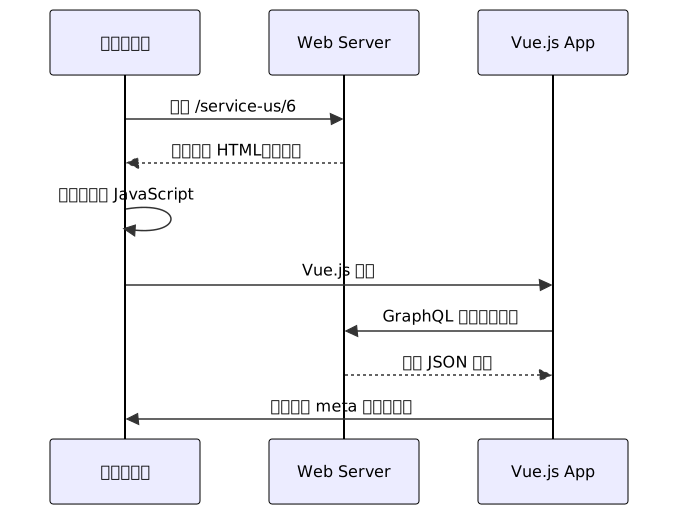
CSR 流程說明:
- 伺服器返回基本 HTML(只有
<div id="app"></div>) - 瀏覽器下載並執行 JavaScript
- Vue.js 啟動後,才動態生成完整內容
- Meta 標籤透過
useHead()或類似 API 動態插入
社交媒體爬蟲的運作方式
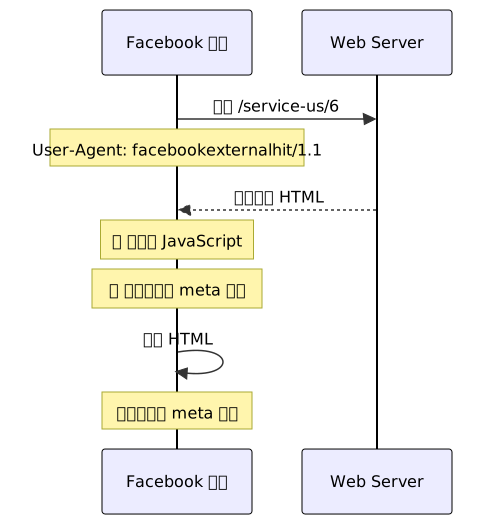
社交媒體爬蟲特性:
| 爬蟲 | User Agent | 是否執行 JS |
|---|---|---|
facebookexternalhit | ❌ 否 | |
| LINE | LineBotMessenger | ❌ 否 |
Twitterbot | ❌ 否 | |
WhatsApp | ❌ 否 | |
Googlebot | ⚠️ 部分支援(有延遲) |
核心衝突: SPA 依賴 JavaScript 動態生成內容,但社交媒體爬蟲不執行 JavaScript,因此無法看到動態 meta 標籤。
我的技術架構
前端:
- Vue.js 3 + Vite
- Tailwind CSS
- Apollo Client (GraphQL)
@vueuse/head(動態 meta 管理)
後端:
- Strapi v5 (Headless CMS)
- GraphQL API
部署:
- Kubernetes + Docker
- Nginx Ingress
動態 meta 設定範例(Vue.js):
// ServicePage.vue
import { computed } from 'vue'
import { useHead } from '@vueuse/head'
import { useQuery } from '@vue/apollo-composable'
import { GET_SERVICE_PAGE } from '@/graphql/queries'

export default {
  setup() {
    const { result } = useQuery(GET_SERVICE_PAGE, {
      pagination: { limit: 100 }
    })

    // 動態計算 meta 標題
    const metaTitle = computed(() => {
      const openGraph = result.value?.layoutDSingles[0]?.openGraph
      return openGraph?.ogTitle || result.value?.title || "預設標題"
    })

    // 動態計算 meta 描述
    const metaDescription = computed(() => {
      const openGraph = result.value?.layoutDSingles[0]?.openGraph
      return openGraph?.ogDescription || "預設描述"
    })

    // 動態設定 meta 標籤
    useHead(() => ({
      title: metaTitle.value,
      meta: [
        { property: 'og:title', content: metaTitle.value },
        { property: 'og:description', content: metaDescription.value },
        { property: 'og:image', content: result.value?.openGraph?.ogImage },
        { property: 'og:url', content: window.location.href }
      ]
    }))

    return { result, metaTitle, metaDescription }
  }
}
GraphQL 查詢範例(Strapi):
query GetServicePage($pagination: PaginationArg) {
  layoutDSingles(pagination: $pagination) {
    id
    title
    content
    openGraph {
      ogTitle
      ogDescription
      ogImage
    }
  }
}
⚠️ 問題: 這些動態 meta 標籤只有在瀏覽器執行 JavaScript 後才會生成,Facebook/LINE 爬蟲完全看不到。
解決方案評估與選擇
三種主流解決方案比較

方案 1:遷移到 Nuxt.js 或其他 SSR 框架
優點:
- ✅ 原生支援伺服器端渲染(SSR)
- ✅ SEO 友善
- ✅ 完整的社交媒體支援
缺點:
- ❌ 需要重寫整個 Vue.js 應用
- ❌ 開發成本極高(數週甚至數月)
- ❌ 可能需要調整現有的 Strapi 整合
評估:
- 開發時間: 4-8 週
- 風險: 高
- 建議: ❌ 不適合已有成熟應用的專案
方案 2:使用預渲染(Prerendering)
技術方案:
- 使用 Vite Plugin Prerender 或 Puppeteer
- 建置時預先生成靜態 HTML
優點:
- ✅ 實作相對簡單
- ✅ 不需要額外的伺服器
缺點:
- ❌ 無法處理動態內容(必須預先知道所有路由)
- ❌ 內容更新需要重新建置
- ❌ 不適合 CMS 驅動的動態頁面
實作範例:
// vite.config.js
import { defineConfig } from 'vite'
import vue from '@vitejs/plugin-vue'
import { VitePluginPrerender } from 'vite-plugin-prerender'

export default defineConfig({
  plugins: [
    vue(),
    VitePluginPrerender({
      // 預渲染的路由(必須手動列出)
      routes: [
        '/',
        '/about',
        '/service-us/1',
        '/service-us/2',
        '/service-us/3'
        // ❌ 如果有 100 個服務頁面,需要列出 100 個路由
        // ❌ Strapi 新增內容後,需要重新建置
      ]
    })
  ]
})
評估:
- 開發時間: 1-2 天
- 維護成本: 高(內容更新需重新部署)
- 建議: ⚠️ 僅適合靜態網站或路由數量少的專案
方案 3:實現專用的 Meta Server(推薦)
架構概念:

優點:
- ✅ 不需要重寫現有 Vue.js 應用
- ✅ 支援完全動態的內容(從 Strapi 實時讀取)
- ✅ 只影響爬蟲請求(用戶體驗不變)
- ✅ 可以獨立部署與擴展
缺點:
- ⚠️ 需要額外的 Node.js 服務
- ⚠️ 需要維護 meta-server 程式碼
評估:
- 開發時間: 2-3 天
- 維護成本: 中等
- 建議: ✅ 最佳解決方案
Meta Server 實作詳解
系統架構
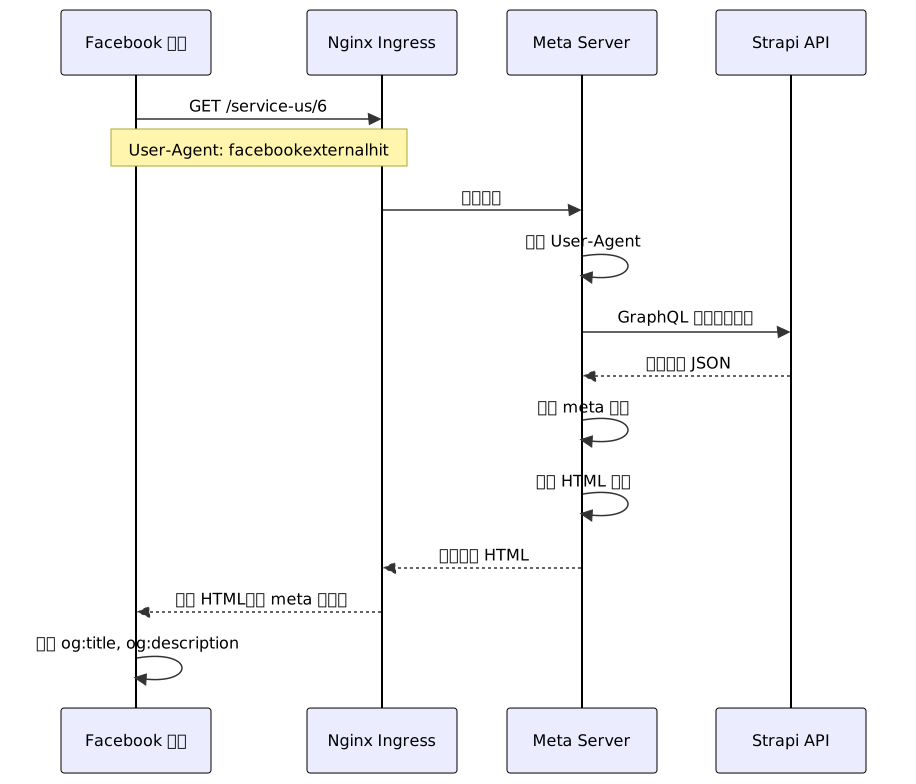
核心程式碼實作
1. Meta Server 主程式(meta-server.js)
// scripts/meta-server.js
const express = require('express')
const { ApolloClient, InMemoryCache } = require('@apollo/client/core')
const { gql } = require('@apollo/client/core')
const fs = require('fs')
const path = require('path')
const app = express()
const PORT = process.env.PORT || 3001
// ============================================
// Apollo Client 設定(連接 Strapi GraphQL API)
// ============================================
const client = new ApolloClient({
uri: process.env.VITE_GRAPHQL_API_URL + '/graphql',
cache: new InMemoryCache(),
headers: {
authorization: `Bearer ${process.env.VITE_GRAPHQL_ACCESS_TOKEN}`
}
})
// ============================================
// GraphQL 查詢
// ============================================
const GET_SERVICE_PAGE = gql`
query GetServicePage($pagination: PaginationArg) {
layoutDSingles(pagination: $pagination) {
id
title
content
openGraph {
ogTitle
ogDescription
ogImage
}
}
}
`
// ============================================
// User Agent 檢測
// ============================================
function isCrawlerRequest(userAgent) {
const crawlers = [
'facebookexternalhit', // Facebook
'Twitterbot', // Twitter
'LinkedInBot', // LinkedIn
'WhatsApp', // WhatsApp
'Line', // LINE
'LineBotMessenger', // LINE Bot
'Googlebot', // Google
'Baiduspider', // Baidu
'Slackbot' // Slack
]
return crawlers.some(crawler =>
userAgent.toLowerCase().includes(crawler.toLowerCase())
)
}
// ============================================
// 讀取 HTML 模板
// ============================================
const htmlTemplatePath = path.join(__dirname, '../dist/index.html')
let htmlTemplate = fs.readFileSync(htmlTemplatePath, 'utf-8')
// 在模板中插入 placeholder
htmlTemplate = htmlTemplate.replace(
'</head>',
'<!-- SEO_META_PLACEHOLDER --></head>'
)
// ============================================
// 生成 Meta 標籤
// ============================================
function generateMetaTags(data, url) {
const baseUrl = process.env.VITE_BASE_URL || 'https://www.abc.com'
const title = data?.openGraph?.ogTitle || data?.title || 'ABCDEFG'
const description = data?.openGraph?.ogDescription || '專業服務平台'
const image = data?.openGraph?.ogImage || `${baseUrl}/default-og-image.jpg`
const fullUrl = `${baseUrl}${url}`
return `
<!-- Open Graph Meta Tags (for Facebook, LINE, etc.) -->
<meta property="og:title" content="${escapeHtml(title)}">
<meta property="og:description" content="${escapeHtml(description)}">
<meta property="og:image" content="${escapeHtml(image)}">
<meta property="og:url" content="${escapeHtml(fullUrl)}">
<meta property="og:type" content="website">
<!-- Twitter Card Meta Tags -->
<meta name="twitter:card" content="summary_large_image">
<meta name="twitter:title" content="${escapeHtml(title)}">
<meta name="twitter:description" content="${escapeHtml(description)}">
<meta name="twitter:image" content="${escapeHtml(image)}">
<!-- Standard Meta Tags -->
<meta name="description" content="${escapeHtml(description)}">
<title>${escapeHtml(title)}</title>
`
}
// HTML 轉義函數(防止 XSS)
function escapeHtml(text) {
const map = {
'&': '&',
'<': '<',
'>': '>',
'"': '"',
"'": '''
}
return String(text).replace(/[&<>"']/g, m => map[m])
}
// ============================================
// 路由處理:服務頁面
// ============================================
app.get('/service-us/:id', async (req, res) => {
const serviceId = req.params.id
const userAgent = req.get('User-Agent') || ''
const isCrawler = isCrawlerRequest(userAgent)
console.log(`[Meta Server] Request for service ${serviceId}`)
console.log(`[Meta Server] User-Agent: ${userAgent}`)
console.log(`[Meta Server] Is crawler: ${isCrawler}`)
try {
// 從 Strapi 獲取服務資料
const { data } = await client.query({
query: GET_SERVICE_PAGE,
variables: { pagination: { limit: 100 } }
})
const serviceData = data?.layoutDSingles?.find(
item => String(item.id) === String(serviceId)
)
if (!serviceData) {
console.log(`[Meta Server] Service ${serviceId} not found`)
return res.status(404).send('Service not found')
}
// 生成 meta 標籤
const metaTags = generateMetaTags(serviceData, req.originalUrl)
// 將 meta 標籤注入 HTML
const html = htmlTemplate.replace(
'<!-- SEO_META_PLACEHOLDER -->',
metaTags
)
res.setHeader('Content-Type', 'text/html; charset=utf-8')
res.send(html)
console.log(`[Meta Server] ✅ Returned HTML with dynamic meta tags`)
} catch (error) {
console.error('[Meta Server] Error fetching service data:', error)
// 失敗時返回預設 meta 標籤
const defaultMetaTags = generateMetaTags({}, req.originalUrl)
const html = htmlTemplate.replace(
'<!-- SEO_META_PLACEHOLDER -->',
defaultMetaTags
)
res.setHeader('Content-Type', 'text/html; charset=utf-8')
res.send(html)
}
})
// ============================================
// 健康檢查端點
// ============================================
app.get('/_health', (req, res) => {
res.status(200).json({ status: 'ok', service: 'meta-server' })
})
// ============================================
// 啟動伺服器
// ============================================
app.listen(PORT, () => {
console.log(`[Meta Server] Running on port ${PORT}`)
console.log(`[Meta Server] GraphQL API: ${process.env.VITE_GRAPHQL_API_URL}`)
})
2. Dockerfile 配置
# Dockerfile.meta
FROM node:18-alpine AS build

WORKDIR /app

# 複製依賴檔案
COPY package*.json ./

# 安裝所有依賴(包括 devDependencies,因為需要 Vite)
RUN npm ci

# 複製原始碼
COPY . .

# 建置 Vue.js 應用
RUN npm run build

# ============================================
# 生產環境
# ============================================
FROM node:18-alpine AS production

WORKDIR /app

# 從建置階段複製檔案
COPY --from=build /app/dist ./dist
COPY --from=build /app/node_modules ./node_modules
COPY --from=build /app/scripts/meta-server.js ./scripts/
COPY --from=build /app/package.json ./

# 環境變數
ENV NODE_ENV=production
ENV PORT=3001

# 暴露端口
EXPOSE 3001

# 啟動 meta server
CMD ["node", "scripts/meta-server.js"]
3. Kubernetes Deployment
# my_web_meta_prod_deployment.yaml
apiVersion: apps/v1
kind: Deployment
metadata:
  name: my-web-meta
  namespace: prod
  labels:
    app: my-web-meta
spec:
  replicas: 2
  selector:
    matchLabels:
      app: my-web-meta
  template:
    metadata:
      labels:
        app: my-web-meta
    spec:
      containers:
        - name: my-web-meta-prod
          image: your-registry/my-web-meta:latest
          ports:
            - containerPort: 3001
              protocol: TCP

          # 環境變數
          env:
            - name: VITE_GRAPHQL_API_URL
              value: "https://api.abc.com"
            - name: VITE_GRAPHQL_ACCESS_TOKEN
              valueFrom:
                secretKeyRef:
                  name: strapi-token
                  key: access-token
            - name: VITE_BASE_URL
              value: "https://www.abc.com"
            - name: PORT
              value: "3001"

          # 資源限制
          resources:
            requests:
              memory: "256Mi"
              cpu: "250m"
            limits:
              memory: "512Mi"
              cpu: "500m"

          # 健康檢查
          livenessProbe:
            httpGet:
              path: /_health
              port: 3001
            initialDelaySeconds: 30
            periodSeconds: 10

          readinessProbe:
            httpGet:
              path: /_health
              port: 3001
            initialDelaySeconds: 10
            periodSeconds: 5

---
apiVersion: v1
kind: Service
metadata:
  name: my-web-meta
  namespace: prod
spec:
  selector:
    app: my-web-meta
  ports:
    - protocol: TCP
      port: 3001
      targetPort: 3001
4. Nginx Ingress 配置
# ingress.yaml
apiVersion: networking.k8s.io/v1
kind: Ingress
metadata:
  name: my-web-ingress
  namespace: prod
  annotations:
    nginx.ingress.kubernetes.io/server-snippet: |
      # 檢測社交媒體爬蟲
      set $is_crawler 0;

      if ($http_user_agent ~* "facebookexternalhit|Twitterbot|LinkedInBot|WhatsApp|Line|LineBotMessenger|Googlebot") {
        set $is_crawler 1;
      }

      # 如果是爬蟲,轉發到 meta-server
      if ($is_crawler = 1) {
        rewrite ^(.*)$ /meta$1 last;
      }

    # SSL 設定
    cert-manager.io/cluster-issuer: "letsencrypt-prod"

spec:
  ingressClassName: nginx
  tls:
    - hosts:
        - www.abc.com
      secretName: www-abc-com-cert

  rules:
    - host: www.abc.com
      http:
        paths:
          # Meta server 路由(僅爬蟲)
          - path: /meta
            pathType: Prefix
            backend:
              service:
                name: my-web-meta
                port:
                  number: 3001

          # 正常 Vue.js SPA 路由(一般用戶)
          - path: /
            pathType: Prefix
            backend:
              service:
                name: my-web
                port:
                  number: 80
部署流程與測試
部署步驟

1. 建置與推送映像
# 建置 Docker 映像
docker build -f Dockerfile.meta -t your-registry/my-web-meta:v1.0.0 .

# 推送到 Registry
docker push your-registry/my-web-meta:v1.0.0

# 標記為 latest
docker tag your-registry/my-web-meta:v1.0.0 your-registry/my-web-meta:latest
docker push your-registry/my-web-meta:latest
2. 部署到 Kubernetes
# 建立 Secret(Strapi token)
kubectl create secret generic strapi-token \
  --from-literal=access-token='your-strapi-token' \
  -n prod

# 部署 meta-server
kubectl apply -f my_web_meta_prod_deployment.yaml

# 更新 Ingress
kubectl apply -f ingress.yaml

# 檢查部署狀態
kubectl get pods -n prod -l app=my-web-meta
kubectl logs -n prod -l app=my-web-meta --tail=50
3. 測試驗證
測試 1:健康檢查
curl http://my-web-meta.prod.svc.cluster.local:3001/_health

# 預期輸出:
# {"status":"ok","service":"meta-server"}
測試 2:模擬爬蟲請求
# 模擬 Facebook 爬蟲
curl -A "facebookexternalhit/1.1" \
  https://www.abc.com/service-us/6 \
  | grep "og:title"

# 預期輸出應包含動態標題:
# <meta property="og:title" content="專業網站開發服務">
測試 3:Facebook Open Graph Debugger
- 訪問 https://developers.facebook.com/tools/debug/
- 輸入 URL:
https://www.abc.com/service-us/6 - 點擊「抓取新資訊」
預期結果:
✅ og:title: 專業網站開發服務
✅ og:description: 提供全方位的網站開發解決方案
✅ og:image: https://www.abc.com/images/service-6.jpg
測試 4:LINE 分享測試
直接在 LINE 中分享連結,檢查預覽卡片:
測試前:
標題:ABCDEFG
描述:(空白)
圖片:(預設 logo)
測試後:
✅ 標題:專業網站開發服務
✅ 描述:提供全方位的網站開發解決方案
✅ 圖片:服務圖片
實施過程中的挑戰與解決
問題 1:GraphQL 認證失敗
症狀:
[Meta Server] Error fetching service data: ApolloError: Connect Timeout Error
原因:
- 環境變數
VITE_GRAPHQL_ACCESS_TOKEN未正確設定 - Strapi API 拒絕未授權的請求
解決方案:
# 1. 確認 Strapi token 正確
kubectl get secret strapi-token -n prod -o jsonpath='{.data.access-token}' | base64 -d

# 2. 檢查 Pod 環境變數
kubectl exec -n prod deployment/my-web-meta -- env | grep GRAPHQL

# 3. 重新建立 Secret
kubectl delete secret strapi-token -n prod
kubectl create secret generic strapi-token \
  --from-literal=access-token='correct-token-here' \
  -n prod

# 4. 重啟 Deployment
kubectl rollout restart deployment/my-web-meta -n prod
問題 2:Docker 建置失敗
症狀:
sh: vite: not found
ERROR: failed to build
原因:
- 使用
npm ci --only=production導致 Vite 未安裝 - Vite 在
devDependencies中,建置階段需要
解決方案:
# ❌ 錯誤做法
RUN npm ci --only=production

# ✅ 正確做法
RUN npm ci  # 安裝所有依賴,包括 devDependencies
問題 3:Kubernetes 資源不足
症狀:
0/1 nodes are available: 1 Too many pods.
原因:
- Node 上 Pod 數量達到上限
- 無法同時運行舊版與新版服務
解決方案(並行部署策略):
# 1. 先縮減舊服務副本數
kubectl scale deployment/my-web --replicas=1 -n prod

# 2. 部署 meta-server
kubectl apply -f my_web_meta_prod_deployment.yaml

# 3. 測試 meta-server
kubectl port-forward -n prod svc/my-web-meta 3001:3001

# 4. 確認無誤後,恢復舊服務副本數
kubectl scale deployment/my-web --replicas=2 -n prod
問題 4:SSL 憑證配置錯誤
症狀:
Warning: secret "www-abc-com-custom-cert" not found
原因:
- Ingress 中引用的 Secret 名稱錯誤
- 實際憑證名稱為
www-abc-com-cert
解決方案:
# 1. 列出所有 TLS Secret
kubectl get secrets -n prod | grep tls

# 2. 修正 Ingress 配置
# ingress.yaml
spec:
  tls:
    - hosts:
        - www.abc.com
      secretName: www-abc-com-cert  # ✅ 修正為正確名稱

# 3. 重新套用
kubectl apply -f ingress.yaml
最佳實踐與經驗總結
1. 理解社交媒體爬蟲的特性
關鍵認知:
| 特性 | 說明 | 應對策略 |
|---|---|---|
| 不執行 JS | 所有動態內容不可見 | ✅ 伺服器端生成 HTML |
| 有特定 User-Agent | 可識別爬蟲請求 | ✅ 透過 Nginx 分流 |
| 快取機制 | Facebook 會快取數小時 | ✅ 使用 Debugger 強制重新抓取 |
| 超時限制 | 爬蟲請求會超時 | ✅ 優化查詢速度 |
Facebook 快取更新方法:
- 使用 Open Graph Debugger
- 點擊「抓取新資訊」按鈕
- 等待 Facebook 重新爬取(約 10-30 秒)
2. 部署策略建議

部署檢查清單:
- 在測試環境完整驗證
- 確認環境變數正確設定
- 備份現有配置
- 準備回滾腳本
- 監控系統就緒
- 通知團隊部署時間
3. 監控與日誌
必要的監控指標:
# prometheus-metrics.yaml
apiVersion: v1
kind: ConfigMap
metadata:
  name: meta-server-metrics
data:
  metrics.js: |
    const prometheus = require('prom-client')

    const requestCounter = new prometheus.Counter({
      name: 'meta_server_requests_total',
      help: 'Total number of requests',
      labelNames: ['user_agent', 'path', 'status']
    })

    const requestDuration = new prometheus.Histogram({
      name: 'meta_server_request_duration_seconds',
      help: 'Request duration in seconds',
      labelNames: ['path']
    })

    module.exports = { requestCounter, requestDuration }
日誌記錄最佳實踐:
// 結構化日誌
function logRequest(req, serviceId, isCrawler, success) {
  const logEntry = {
    timestamp: new Date().toISOString(),
    service: 'meta-server',
    method: req.method,
    path: req.path,
    serviceId,
    userAgent: req.get('User-Agent'),
    isCrawler,
    ip: req.ip,
    success,
    responseTime: Date.now() - req.startTime
  }

  console.log(JSON.stringify(logEntry))
}
4. 錯誤處理與降級策略
// 優雅降級
app.get('/service-us/:id', async (req, res) => {
  try {
    // 嘗試從 Strapi 獲取資料
    const data = await fetchServiceData(serviceId)

    if (data) {
      return res.send(generateHTML(data))
    }

    // 資料不存在,返回預設 meta
    return res.send(generateDefaultHTML())

  } catch (error) {
    // 錯誤發生,記錄並返回預設 meta
    logger.error('Failed to fetch service data', { error, serviceId })

    // ✅ 確保服務不中斷
    return res.send(generateDefaultHTML())
  }
})
替代方案探討
雖然我最終採用 Meta Server 方案,但也值得了解其他選項。
方案 A:Cloudflare Workers
在 CDN 層面處理爬蟲請求:
// cloudflare-worker.js
addEventListener('fetch', event => {
  event.respondWith(handleRequest(event.request))
})

async function handleRequest(request) {
  const userAgent = request.headers.get('User-Agent') || ''

  // 檢測爬蟲
  const isCrawler = /facebookexternalhit|Twitterbot|LinkedInBot/i.test(userAgent)

  if (isCrawler) {
    // 從 Strapi API 獲取資料
    const url = new URL(request.url)
    const serviceId = url.pathname.split('/').pop()

    const data = await fetch(`https://api.abc.com/api/services/${serviceId}`)
    const json = await data.json()

    // 返回動態生成的 HTML
    return new Response(generateHTML(json), {
      headers: { 'Content-Type': 'text/html' }
    })
  }

  // 正常請求,返回 SPA
  return fetch(request)
}
優點:
- ✅ 全球分布的邊緣運算
- ✅ 響應速度快
- ✅ 不需要額外伺服器
缺點:
- ⚠️ Cloudflare Workers 有執行時間限制
- ⚠️ 需要調整現有 DNS 設定
方案 B:Prerender.io 第三方服務
使用專業的預渲染服務:
# nginx.conf
location / {
  # 檢測爬蟲
  if ($http_user_agent ~* "bot|crawler|spider|facebookexternalhit") {
    proxy_pass https://service.prerender.io/https://www.abc.com$request_uri;
  }

  # 正常用戶
  proxy_pass http://vue-spa-backend;
}
優點:
- ✅ 零維護成本
- ✅ 支援所有爬蟲
- ✅ 專業團隊維護
缺點:
- ⚠️ 月費約 $10-200(依流量)
- ⚠️ 依賴第三方服務
結論與下一步
關鍵收穫
✅ 技術選型的重要性
- 在專案初期就應該考慮 SEO 和社交媒體分享需求
- SPA 雖然開發體驗好,但在 SEO 方面有天然劣勢
✅ 漸進式改進優於重寫
- 不需要從 Vue.js 遷移到 Nuxt.js
- 透過添加 Meta Server 解決特定問題
✅ 充分的測試與監控
- 使用 Facebook Debugger 驗證
- 實際在 LINE/Facebook 中測試
- 建立完整的日誌與監控
✅ 部署安全第一
- 並行部署策略
- 快速回滾機制
- 分階段切換流量
完整架構總結

後續改進方向
效能優化
- 加入 Redis 快取(減少 Strapi 查詢)
- 實作 CDN 快取策略
- 壓縮 HTML 輸出
功能擴展
- 支援更多路由類型(部落格、產品頁)
- 加入結構化資料(JSON-LD)
- 支援多語言 meta 標籤
監控增強
- 整合 Prometheus + Grafana
- 設定 Slack 告警
- 建立效能儀表板
最後的建議
給 SPA 開發者的建議:
如果是新專案:
- 考慮使用 Nuxt.js、Next.js 等 SSR 框架
- 從一開始就規劃 SEO 策略
如果是既有專案:
- 評估 Meta Server 方案(本文介紹)
- 或考慮 Cloudflare Workers 等邊緣運算方案
無論哪種方案:
- 務必測試 Facebook Debugger
- 在實際社交平台驗證
- 建立完整的監控機制
記住,技術問題總有解決方案,關鍵是要理解問題的本質,選擇合適的方法,並在實施過程中保持謹慎和耐心。